
Designing Restricted Temporary WordPress Accounts for Safe Plugin Demos
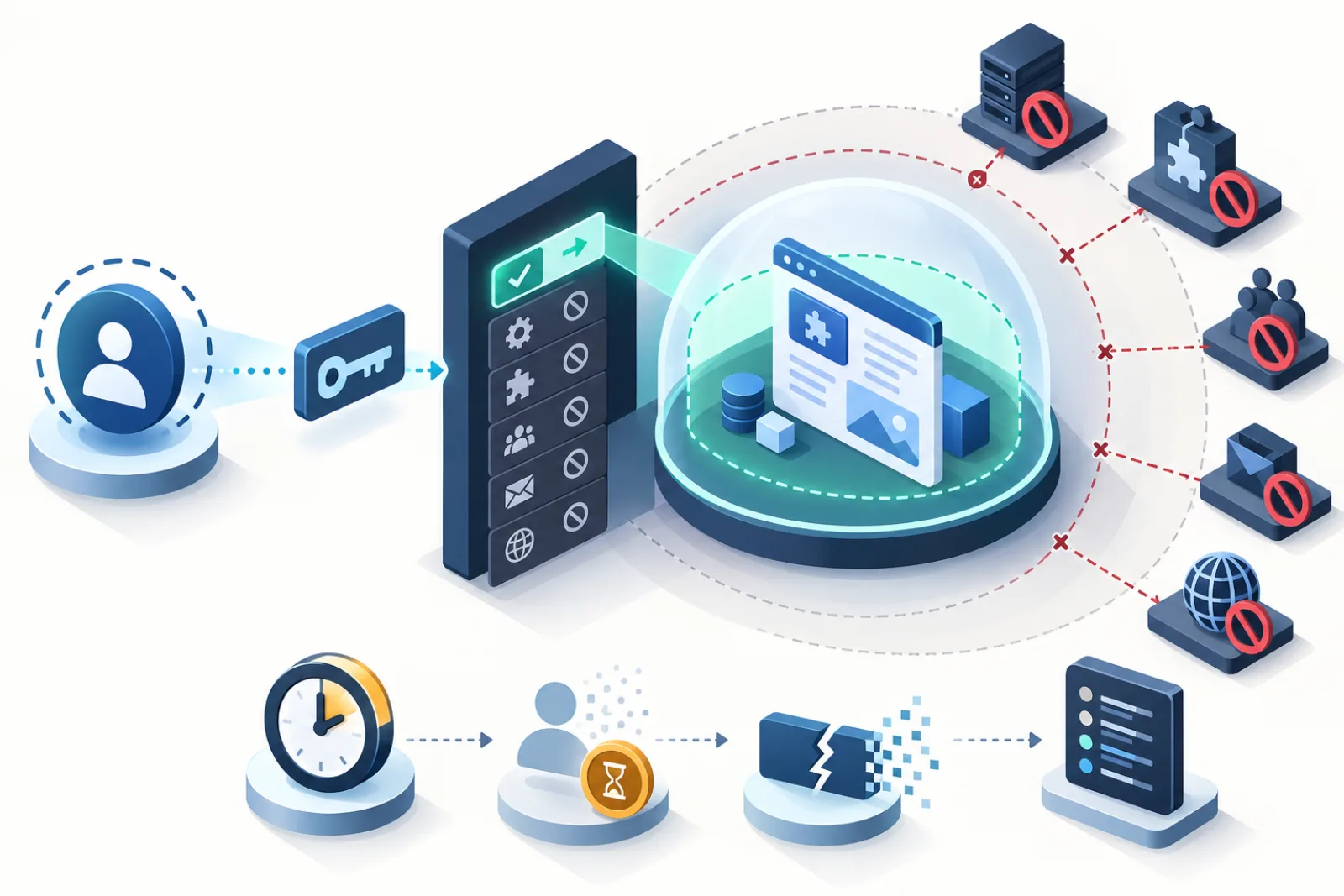
A safe WordPress demo account is disposable, narrowly authorized and confined to one temporary site. Do not hand public visitors a normal Administrator account and rely on cleanup later. Define the actions the demo requires, grant only those capabilities, issue a single-use short-lived launch token, block dangerous outbound effects and prove the account becomes unusable at expiry.
Write the demo’s permission contract
List what a visitor must accomplish to evaluate the plugin: create sample records, change plugin settings, upload a test image or run a report. Map each action to WordPress capabilities and plugin-specific authorization checks. Everything not required is denied. WordPress recommends least privilege and capability checks; a role name by itself is not an authorization decision.
| Surface | Typical demo decision | Test |
|---|---|---|
| Plugin settings | Allow only required demo controls | Every action checks a dedicated capability |
| Posts/media | Allow within temporary site and quotas | Cannot alter other authors/sites |
| Plugins/themes | Deny install, upload, edit and activate | Direct URLs and API calls fail |
| Users | Deny create, promote, delete and export | Network and site endpoints fail |
| Network Admin | Deny completely | No menu, route or REST access |
| Email/external HTTP | Block or allowlist | No real message or side effect leaves |
Create a dedicated temporary role
Start from no capabilities and add the smallest set, including purpose-built capabilities from the demonstrated plugin. Avoid cloning Administrator and subtracting a few obvious powers; new WordPress or plugin capabilities can appear later and broaden access unexpectedly. Rebuild and regression-test the role after updates.
In Multisite, distinguish site Administrator from Super Admin. Network-level capabilities and screens must remain unavailable. Test with current_user_can() or the site-aware capability APIs in real handlers, not merely by hiding menu items. A visitor who knows a direct URL can bypass cosmetic navigation.
Design a truly single-use launch token
WordPress nonces help defend against CSRF, but official documentation states they are not one-time tokens and must not be used for authentication or authorization. Generate a separate high-entropy token, store only a hash, bind it to one sandbox/account, give it a short expiry, and consume it atomically before creating the authenticated session. Reject replay even inside the time window.
Do not put permanent passwords, emails or privileged tokens in browser-visible markup, analytics or logs. Use HTTPS, rotate authentication cookies when signing in, and invalidate outstanding launch tokens when the sandbox expires, resets or is deleted.
Contain side effects beyond capabilities
A plugin demo can trigger email, webhooks, remote APIs, scheduled actions, imports or large uploads even when the user cannot manage plugins. Block outgoing email at the application boundary and short-circuit external HTTP by default, with an explicit allowlist for infrastructure that the demo genuinely needs. Return realistic local responses where necessary so the feature can be evaluated without contacting customers, payment providers or production CRMs.
- Set upload type and size limits and scan any retained files.
- Disable application-password creation and profile escalation.
- Rate-limit mutations as well as launches.
- Keep secrets and production API credentials out of the sandbox configuration.
- Partition cache keys, sessions and object-storage paths by site/session ID.
- Do not expose debug logs, filesystem editors or environment information.
Make expiry an authorization boundary
The countdown is a user-interface aid; server-side checks are authoritative. On every privileged demo action, confirm the sandbox is active. At expiry, refuse new requests, revoke login sessions and launch tokens, then begin cleanup. If deletion is delayed, the account must still be locked. This prevents a failed cleanup worker from extending access indefinitely.
Test from the attacker’s path
Build a deny matrix and test direct admin URLs, REST endpoints, AJAX actions, form posts and multisite routes. Attempt role promotion, plugin upload, user enumeration, network navigation, outbound webhooks, oversized uploads, token replay and continued use after expiry. Verify server responses and absence of side effects—not only hidden buttons.
Audit plugin-specific authorization
A custom plugin can accidentally bypass WordPress’s ordinary screens through an AJAX action or REST route. Inventory every state-changing endpoint used by the demo and confirm it performs both authentication and a meaningful capability check. Validate object ownership where a capability depends on a post, order or other record. Nonces protect request intent but do not replace these checks. Repeat the audit whenever the demonstrated plugin adds imports, webhooks, file tools or account integrations.
Prevent cross-sandbox data leakage
Create two sandboxes concurrently and attempt to access each other’s posts, media URLs, REST objects, cached responses and reset endpoints. Site IDs must be part of every lookup and cache namespace. Predictable subdomains are acceptable only when authorization does not depend on secrecy. Logs and analytics should use a random session identifier and avoid email, IP-derived fingerprints or launch tokens.
Operational response if a boundary fails
Disable new launches, revoke active temporary sessions and preserve logs before cleanup. Determine whether the failure crossed sites or reached an external service. Rotate any exposed credential, notify affected service owners and patch the shared authorization point. Then rerun the complete deny matrix; fixing the visible menu while leaving its endpoint open is not remediation.
Start with a threat model
Assume a visitor can inspect requests, alter parameters, call endpoints directly, upload crafted files, retain URLs after expiry and collaborate with another sandbox. List protected assets: network administration, other sites, filesystem, database, credentials, email reputation and external services.
Capabilities are one layer; containment must cover every trust boundary the demonstrated plugins expose.
Create a dedicated role
Grant only actions required by the demo journey. Avoid Administrator and avoid copying a broad production role. Map each UI task to capability and verify direct REST, AJAX and admin URLs. Hiding a menu is not authorization.
Review role changes after plugin updates because new capabilities and endpoints can appear.
Provision a unique temporary identity
Create a sandbox-bound user with no reuse across visitors. Store lifecycle state separately from display name or email. Use synthetic data and avoid predictable credentials. Membership must be limited to the intended subsite.
On Multisite, verify the account has no network or sibling-site role.
Design one-time launch tokens
Generate high-entropy tokens, store a hash, bind to sandbox and intended action, expire quickly and consume atomically. A read-then-mark flow allows two requests to redeem the same link. Never place durable credentials in URLs or logs.
After redemption, rotate the session and redirect to a clean URL so browser history and referrers do not retain the token.
Protect token delivery
Use HTTPS, restrictive referrer policy and no shared cache for launch responses. Do not send tokens to third-party analytics, error trackers or chat transcripts. If a visitor requests another link, revoke or distinguish earlier grants according to policy.
Rate-limit creation and redemption without locking out legitimate shared networks.
Validate authorization on every request
Check current sandbox state, membership, capability and resource ownership in admin, REST, AJAX and upload handlers. Nonces protect request intent but are not authorization. Never accept a blog ID, post ID or path solely because it came from the UI.
Return bounded errors without exposing other tenant identifiers.
Isolate database objects
Ensure every query and mutation is scoped to the current site and owned resource. Audit custom global tables used by plugins. A missing blog or tenant predicate can expose records despite correct WordPress roles.
Use synthetic starter data and verify search, exports and reports cannot cross the boundary.
Isolate files and uploads
Validate uploads, MIME, dimensions and storage path. Prevent traversal and executable uploads. Sandbox file access should remain within its assigned root or prefix; shared media needs explicit read-only policy.
Test guessed sibling URLs, attachment endpoints and generated derivatives. Security through unlinked filenames is insufficient.
Block outbound email safely
Intercept all WordPress email paths used by the demo and test plugins that use direct providers or custom APIs. Show a truthful in-sandbox mailbox or log if users need to see generated messages. Never send to addresses entered by anonymous visitors.
Keep internal security alerts on a separate trusted channel so blocking demo email does not silence operations.
Control outbound HTTP
Default-deny or narrowly allow required destinations for demo subsites. Validate scheme, host, resolved address and redirects to prevent server-side request forgery into internal services. Re-resolve safely and block private/link-local ranges according to platform design.
Do not log secrets or response bodies. Provide mocks for demonstrated integrations where real calls could charge money or alter data.
Contain plugin-specific endpoints
Inventory REST routes, AJAX actions, webhooks, cron jobs, CLI commands and file handlers added by the demonstrated plugin and dependencies. Test each as anonymous, temporary user, sibling user and administrator. UI restrictions do not cover custom endpoints automatically.
Update the inventory whenever the product version changes.
Restrict installation and code editing
Temporary users should not install plugins/themes, edit files, upload executable code or change network settings unless that exact risk is the isolated product being tested. Disable dangerous capability and endpoint paths, not just navigation.
Keep dependencies preapproved and installed by the trusted provisioning service.
Bound resource abuse
Limit launches, uploads, requests, expensive operations, background jobs and lifetime. Combine per-account, token and network signals carefully. Admission controls should protect cleanup and administrators while giving legitimate visitors a clear retry message.
Monitor PHP queue, database connections, storage and external-call attempts by sandbox.
Make expiry immediate for authorization
At expiry, mark the sandbox inactive and reject every privileged request before asynchronous cleanup. Revoke sessions and launch tokens. Do not rely on a countdown in JavaScript or a future cron deletion.
Test an already-open editor, cached REST call and direct endpoint after expiry.
Handle clock and cache correctly
Use server-side authoritative time and consistent timezone handling. Cached authorization must not outlive the sandbox. Test clock boundaries, long requests crossing expiry and browser sleep.
A request that starts before expiry needs an explicit policy; destructive or external actions should recheck before commit.
Prevent cross-sandbox cache leakage
Include site and user context in object, fragment and CDN cache keys. Authenticated responses must bypass shared public caches. Alternate requests from two sandboxes and verify content, nonces and media never cross.
Purge sandbox-specific keys at reset and cleanup without flushing unrelated tenants.
Audit reset behavior
Reset must remove visitor changes, revoke old sessions or tokens as designed, restore starter state and preserve containment. Already-running jobs should stop writing after reset. Give each generation a new identifier so stale requests cannot mutate the replacement.
Verify files, custom tables, queues and external mocks, not only posts.
Log security-relevant events
Record launch, redemption, authorization denial, rate limit, outbound block, reset, expiry and cleanup with sandbox ID and safe reason. Exclude raw tokens, cookies, passwords and personal content. Retain according to an explicit policy.
Alert on cross-tenant attempts, repeated blocked destinations and any access after expiry.
Run an attacker-path test matrix
| Test | Expected result |
|---|---|
| Replay launch token | Denied after atomic consumption |
| Change site/post ID | Denied outside owned sandbox |
| Call hidden REST action | Capability and ownership enforced |
| Request internal URL | Outbound policy blocks it |
| Act after expiry | Authorization fails immediately |
| Read sibling cache/file | No cross-sandbox response |
Respond to a containment failure
Pause new launches, revoke affected sessions/tokens, preserve sanitized logs and identify the boundary crossed. Rotate exposed credentials, inspect sibling sites and external systems, and follow the incident-notification policy. Do not destroy evidence by resetting everything immediately.
Fix and reproduce on staging, then revalidate the full matrix before reopening.
Definition of done
The temporary role supports only the demo contract; launch tokens are single-use, hashed and short-lived; every endpoint enforces state, capability and ownership; files, database and caches remain isolated; outbound email/HTTP cannot create real-world harm; expiry revokes access immediately; and reset/cleanup invalidate stale work. Attacker-path tests and incident rollback pass for the installed product.
Test password reset and account recovery
Temporary demo identities should not use ordinary password-reset flows unless explicitly required. Request reset links, inspect email containment and ensure a visitor cannot extend access beyond sandbox lifetime. Support tools must verify sandbox ownership without revealing other accounts.
At expiry, invalidate recovery keys along with sessions and launch tokens.
Review media privacy
Visitors may upload documents or images containing personal information. Warn against sensitive uploads, enforce retention, prevent directory listing and block sibling access. Cleanup must remove originals, derivatives, metadata and remote copies according to policy.
Do not send demo uploads to AI or optimization services without explicit controlled design.
Protect administrative APIs
Application passwords, XML-RPC, REST authentication and plugin-issued API keys can outlive the browser session. Prevent temporary users from creating durable credentials, or bind and revoke them with sandbox lifecycle. Enumerate keys during cleanup.
Test direct API calls after expiry and reset.
Constrain exports and imports
Exports can leak starter or cross-tenant data; imports can exhaust resources or introduce active content. Limit permitted formats, bytes, records and destinations. Sanitize files and process in bounded jobs tied to current generation.
Reject stale import workers after reset or expiry.
Review plugin dependency trust
Each declared dependency inherits the sandbox user’s inputs and can add endpoints or outbound calls. Pin reviewed versions, verify packages and re-run the threat matrix after updates. Do not allow visitors to choose arbitrary packages.
Maintain an owner and rollback for the demo product set.
Use safe synthetic content
Starter users, orders, messages and analytics should be fictional and visibly marked. Remove real emails, addresses, tokens and customer identifiers. Ensure generated screenshots and exports cannot be mistaken for production records.
Reset tests should verify synthetic content is restored exactly.
Audit administrator support tools
Session viewing, impersonation, extension and termination controls require strong capability, request verification and audit. Avoid exposing raw login tokens. Operators should see state and safe identifiers, then perform one bounded action.
Test that client roles cannot reach the tools by direct URL or endpoint.
Maintain the threat model
Review after WordPress, Multisite, demonstrated plugin, proxy, cache or storage changes. Add new routes and resource classes before public launch. Retire controls only with evidence that the surface disappeared.
Track known limitations and time-bound exceptions with accountable owners.
Test session fixation and cookie scope
Set a session before launch, redeem the token and confirm authentication rotates appropriately. Verify cookies are Secure, appropriately scoped and unavailable to sibling hosts where architecture permits. Logout, expiry and reset must invalidate the old session.
Test concurrent browsers so one launch cannot authenticate another visitor accidentally.
Protect against CSRF and clickjacking
State-changing actions need request verification plus authorization. Admin and demo pages should use framing policy appropriate to the product without allowing hostile sites to drive clicks. Test forged forms and cross-origin requests against sensitive endpoints.
Do not weaken protections merely because the account is temporary; the infrastructure and external side effects are real.
Limit data enumeration
Temporary users should not list network users, sibling sites, private media or global plugin data. Inspect REST indexes, search endpoints, author archives, sitemaps and error responses. Return only owned resources and avoid revealing whether a guessed foreign ID exists.
Test sequential and random identifiers from the attacker path.
Control webhooks and callbacks
Visitors may configure URLs that cause the server to call external systems later. Apply outbound policy at execution time, not only when saving settings, and tie jobs to active generation. Use mocks for the demo journey.
After expiry or reset, stale webhook jobs must fail closed without repeated retries.
Review support impersonation
If operators can enter a sandbox, require strong capability, explicit reason, short-lived access and audit. Never reveal the visitor’s one-time token. Show an in-product indicator where policy requires and prevent support access from crossing sites.
Revoke the support session when the sandbox expires.
Define disclosure and acceptable use
Tell visitors the environment is temporary, synthetic, monitored for security and unsuitable for sensitive data. Explain lifetime, reset and outbound restrictions. Provide a vulnerability-reporting path and abuse response.
Clear disclosure supports safe behavior but never replaces technical enforcement.
Run a final least-privilege review
Start from a fresh temporary account and enumerate its effective capabilities, menus, endpoints, files and external effects. Remove permissions not exercised by the approved demo journey, then repeat that journey to prove usability. Test a direct request for every removed privilege.
Record the role and plugin versions so future capability additions are detectable. A new feature must earn its permission through an updated threat model and regression test.
Monitor containment in production
Alert on denied cross-site identifiers, internal-network destinations, email attempts, durable credential creation and activity after expiry. Aggregate by sandbox and safe reason; never log raw launch tokens or visitor content. Establish thresholds that separate one mistake from automated probing.
Pause admissions when a boundary fails, preserve evidence and follow the documented incident response before reopening.
Test the role and containment policy with the exact plugin versions visitors use, including every dependency. A harmless core role can become powerful when a plugin registers an endpoint with an incomplete permission callback. Keep a release inventory of routes, capabilities, outbound destinations and persistent credentials; any unexplained expansion blocks public rollout until an accountable reviewer resolves it.
Include negative tests for actions initiated before expiry but completed afterward. Long uploads, imports, remote requests and queued jobs should recheck active sandbox generation before their irreversible commit. Otherwise a visitor can start a permitted action seconds before expiry and create data or external effects after access is supposed to end.
Record these denials with safe correlation IDs and clear visitor messages. The response should explain that the demo expired without revealing internal site identifiers, paths or security policy details.
How WPStack Sandbox Manager fits
WPStack Sandbox Manager 0.3.2 is described as creating a real isolated Multisite subsite per visitor with one-time automatic login, timed expiry, concurrency/repeat-launch limits, and blocks for outgoing email and external HTTP from demo subsites. It installs the selected plugin and declared dependencies.
Operational responsibility remains with you: it is self-hosted and Multisite-only. Verify the installed release’s capabilities against every demonstrated plugin, especially plugins that add custom REST/AJAX actions or communicate outside WordPress. Community edition supports one configured demo product.
Related WPStack guides
Frequently asked questions
Can a temporary demo user be an Administrator?
A narrowly tailored role is safer. Administrator includes broad powers that most plugin evaluations do not require.
Is a WordPress nonce a one-time login token?
No. WordPress explicitly says nonces can be reused during their validity window and must not provide authentication or access control.
Is hiding Network Admin enough?
No. Enforce capabilities on direct URLs, handlers and APIs; menu removal is only presentation.
Why block outgoing HTTP and email?
Public visitors could trigger spam, webhooks, payments or changes in third-party systems using the demo’s server identity or credentials.
What if cleanup is delayed?
Expiry must independently revoke access. Deletion can retry in the background while the account remains locked.
References
- WordPress users and least privilege
- WordPress roles and capabilities
- WordPress nonces
- WordPress pre_http_request hook
- WordPress pre_wp_mail hook

Aditya Bhimrajka is a technology entrepreneur, product strategist, and software solutions expert with over a decade of experience building scalable web and mobile applications. His expertise spans SaaS, AI, cloud technologies, custom software development, and digital transformation. Passionate about solving real-world business challenges through technology, Aditya shares practical insights on WordPress, plugins, software development, startup growth, product strategy, and emerging technologies. At WPStack, he writes actionable, experience-driven content that helps developers, businesses, and website owners build secure, high-performing, and future-ready WordPress solutions.