
Custom WordPress Plugin vs SaaS: Which Is Right for Your Product?

A custom WordPress plugin and a SaaS both solve the same problem – turning an idea into software you can charge for – but trade off in opposite ways. The right answer depends on your moat, your team, your compliance posture, and how patient your capital is. This guide compares the two honestly across cost, control, time-to-market, scaling, and the hybrid patterns most founders miss.
How to read this comparison
“Plugin” here means a self-hosted WordPress plugin you or your customer installs on their own site. “SaaS” means software that runs on infrastructure you or a third party controls. The honest answer is rarely “always plugin” or “always SaaS”. Most teams we work with in 2026 end up hybrid – the rest of this guide will help you figure out which mix fits yours.
What we mean by “custom WordPress plugin” in 2026
Custom WordPress plugin development in 2026 is not the janky PHP of 2014. Modern plugins ship as a single Composer package, use namespaced PHP 8.2+, register blocks via block.json, expose REST endpoints under a custom namespace, and lean on Action Scheduler or WP-Cron for background work. They can talk to any external API, render React-based admin UIs, and integrate with WooCommerce, ACF, or any major meta framework.
On the deployment side, a plugin can be sold as a one-time license, a yearly subscription, a hosted offering on your own infrastructure, or even a private single-tenant build per client. Distribution can go through the WordPress.org repository, your own licensing server, or a simple ZIP download.
What we mean by “SaaS” in 2026
A SaaS product in 2026 is typically a multi-tenant web app – Next.js, Laravel, Rails – served from a cloud provider, with managed database, auth, billing, and observability. From a buyer’s view, it is “log in and use it”. From a builder’s view, it is a continuous ops commitment: uptime, security patches, support, SOC2 paperwork, and the slow accrual of platform lock-in.
The line between a “plugin” and a “SaaS” is blurry. A plugin with a hosted companion is closer to SaaS. A SaaS that customers can self-host is closer to a plugin. We will be specific throughout.
Cost comparison
Five-year TCO is where the decision usually gets settled. Below is a side-by-side model using conservative 2026 numbers for three company sizes. Plugin cost includes build, maintenance, and infra for a hosted variant. SaaS cost includes development, monthly infra, support tooling, and the always-rising compliance tax.
| Company size | Plugin (5-yr TCO) | SaaS (5-yr TCO) | Delta |
|---|---|---|---|
| Solo founder, niche product | $45k – $90k | $180k – $350k | Plugin ~3-4x cheaper |
| Seed startup, 5-person team | $180k – $400k | $700k – $1.4M | Plugin ~3x cheaper |
| Series A+, 25+ customers, multi-tenant | $600k – $1.2M | $2M – $5M+ | Plugin ~3x cheaper; SaaS wins on ops scale |
These numbers assume the plugin sells as a yearly subscription with maintenance equal to 20% of initial build cost. SaaS assumes a small infra team, Datadog-class monitoring, auth and billing tooling, and one full-time SRE-equivalent by year three. For a deeper breakdown of what drives the plugin number, see our post on how much custom WordPress plugin development costs in 2026.
Control and data ownership
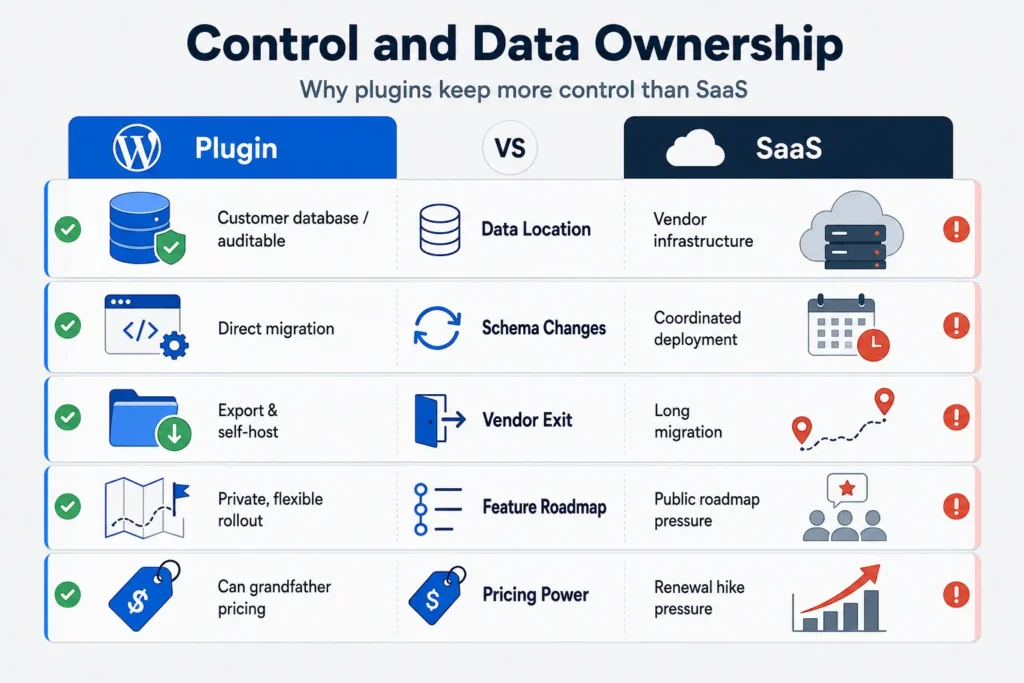
Control is where plugins win unambiguously and where SaaS loses, full stop.
- Where the data lives. A plugin stores data on the customer’s own WordPress database or your companion service that they can audit. A SaaS holds all customer data on infrastructure you own and that you can be compelled to share.
- Schema changes. You can run a migration on a plugin without coordinating with hundreds of customers. On SaaS, every schema change is a deployment window and a migration plan across tenants.
- Vendor exit. A plugin customer can migrate to a competitor or self-host by exporting their WP database. A SaaS customer faces a CSV export and a multi-week migration at best.
- Feature roadmap. A plugin shipped under your brand can pivot in private with one customer at a time. A SaaS product roadmap is public and your customers vote with churn.
- Pricing power. Plugin vendors can grandfather. SaaS vendors get accused of price hikes every renewal cycle.
Time-to-market
Time-to-market is the single biggest reason founders reach for SaaS in the first place. With modern frameworks and a generous free tier of managed services, you can ship a usable MVP in two to four weeks. A custom WordPress plugin is usually slower to first revenue, because the plugin model demands a WordPress admin UI, an onboarding flow inside wp-admin, and a license key system before you can charge.
That gap is shrinking. Modern block-based onboarding flows, action-scheduler-driven installers, and hosted license servers can take a plugin MVP from kickoff to first paying customer in three to five weeks for a focused feature. The dev time below assumes one senior engineer full-time, with a designer and a part-time QA.
| Scope | Plugin MVP | SaaS MVP |
|---|---|---|
| Single feature, auth + billing | 4-6 weeks | 2-4 weeks |
| Mid-scope, 3-5 features, admin UI | 8-12 weeks | 6-10 weeks |
| Full product, multi-tenant, roles | 16-24 weeks | 10-16 weeks |
The plugin column assumes your team is comfortable in WordPress and PHP. If they are stronger in TypeScript than PHP, plan for an extra 30-50% on the plugin number. Our WooCommerce extension development guide walks through the same trade-offs for ecommerce builds.
Scaling story
Scaling is the chapter where the answer flips. Plugins scale differently than SaaS, and each model breaks at different points.
10x usage. For a plugin, the work is mostly in support, documentation, and bug-fix volume. Infra cost grows slowly because each customer runs their own copy. For a SaaS, 10x usage usually means a database sharding conversation, a re-architected cache layer, and a real on-call rotation.
100x usage. A plugin at 100x customers means a serious licensing and update server, multi-region distribution, and a support org. A SaaS at 100x means a platform team, a security review board, and a managed Postgres provider on a six-figure annual contract.
For a SaaS, the first thing to break is the database or the multi-tenant auth boundary. For a plugin, it is the support queue and the “works on every host” promise. Plan for both.
Compliance and integrations
Compliance is where the comparison gets less obvious. A plugin can be HIPAA-friendly, GDPR-clean, and PCI-DSS-aligned, but only if your customers’ environments are. You inherit their hosting, patch cadence, and backup story. A SaaS gives you one environment to harden and audit, but you inherit a continuous obligation to prove it.
For healthcare and financial customers in 2026, the honest answer is often hybrid: a plugin that processes sensitive data on the customer’s environment, with a thin hosted companion for things only you can do. You sign a much smaller BAA.
For GDPR, the plugin model is friendlier because data minimisation is built into the deployment model. For niche integrations – ERPs, CRMs, regional tax APIs, specialty shipping carriers – both approaches struggle. Plan for two to four weeks of integration work per niche system, regardless of path.
Four hybrid models most founders overlook
Most founders we talk to assume the choice is binary. It is not. The four patterns below cover roughly 70% of the “I do not know which to pick” calls we make at WPStack.
1. Plugin-first, hosted companion
The plugin runs the customer-facing feature. Your hosted service handles licensing, telemetry, or AI features that need GPUs. You run a small Node or Laravel service on Fly, Render, or your own VPS. This is the model behind most successful WooCommerce extensions. Right starting point if your moat is the integration with WordPress itself.
2. SaaS-first, WordPress embed
Your product is a SaaS. You ship a free WordPress plugin that embeds your hosted UI inside a Gutenberg block, authenticates against your service, and pulls live data. This is the model behind many AI tools and analytics products, and the right choice when your moat is data or model and WordPress is just a delivery channel.
3. Multi-tenant plugin under your control
You build a single WordPress multisite instance, install your plugin once, and sell seats to customers who log in to a subdomain you control. The catch is that every customer shares the same database, which makes SOC2 harder and noisy-neighbour problems real.
4. On-prem plugin with paid support
You ship a plugin under a copyleft license, sell annual support contracts, and let customers host it on their own infrastructure. Money comes from upgrades, SLA-backed support, and premium add-ons. The right model for regulated industries where the customer will never let you host their data.
Decision framework
The right answer depends on what you are protecting.
- If your moat is data, choose SaaS. You need one environment to train on customer behaviour, run experiments, and tighten the flywheel. A plugin that exports data gets close but is rate-limited by what customers will share.
- If your moat is the integration with WordPress, choose plugin. If your value lives in deep hooks into wp-admin, WooCommerce, or ACF, a SaaS rebuilds too much of what WordPress already gives you.
- If you need to ship in two weeks, choose SaaS for the MVP, then port. Use a managed framework and Stripe to validate demand. Once you know the product shape, port the core to a plugin if the economics work.
- If you are selling to regulated buyers, choose plugin with hosted companion. You keep customer data on their environment. You host only what they cannot run. Buyers sign faster and your SOC2 scope stays small.
Quick comparison table
| Dimension | Custom WordPress Plugin | SaaS | Verdict |
|---|---|---|---|
| 5-year cost (mid-size) | $180k – $400k | $700k – $1.4M | Plugin |
| Data ownership | Customer-owned | Vendor-owned | Plugin |
| Time to first revenue | 4-6 weeks (focused MVP) | 2-4 weeks | SaaS |
| Scaling story at 10x | Support and licensing burden | Infra rewrite burden | Tie |
| Scaling story at 100x | Multi-region updates, support org | Platform team and SOC2 | SaaS |
| Compliance scope | Inherits customer’s environment | You own the whole scope | Tie |
| Pricing flexibility | One-time, yearly, perpetual | Subscriptions only | Plugin |
| Customer exit cost | Low (export database) | High (multi-week migration) | Plugin |
FAQ
Yes, but expect a 60-90 day rebuild of the data layers and the auth boundary. Plan it after you have paying SaaS customers and a clear sense of which features they actually use.
Also yes, often easier. Ship a thin SaaS that reads from your plugin’s API, or run a managed multi-tenant instance on your own infra. The risk is breaking compatibility for existing customers, so budget a parallel maintenance window.
Plugins win on SEO if your customers’ sites already rank. They inherit domain authority, backlinks, and Core Web Vitals. SaaS builds from zero and pays for traffic. For SEO-led products, plugin or hybrid almost always wins.
AI features with GPU costs, large embeddings, or rate-limited quotas usually belong on your hosted side, even if the UI lives in WordPress. The plugin-with-hosted-companion pattern shows up across A! search, RAG, and OpenAI-powered plugins in 2026.
Choose the right product path
Use the custom plugin pricing guide to test the budget, explore production examples in the WPStack plugin directory, or request a plugin-versus-SaaS architecture session.
Related reading
Compare this product decision with the custom plugin cost breakdown, the free versus custom decision guide, and the production-readiness checklist.

Aditya Bhimrajka is a technology entrepreneur, product strategist, and software solutions expert with over a decade of experience building scalable web and mobile applications. His expertise spans SaaS, AI, cloud technologies, custom software development, and digital transformation. Passionate about solving real-world business challenges through technology, Aditya shares practical insights on WordPress, plugins, software development, startup growth, product strategy, and emerging technologies. At WPStack, he writes actionable, experience-driven content that helps developers, businesses, and website owners build secure, high-performing, and future-ready WordPress solutions.
A WordPress Commenter
August 30, 2026 at 3:27 am
“ The section is useful for anyone studying market structure. dividend stock analysis “