
Capacity Planning for Public WordPress Plugin Demo Sandboxes
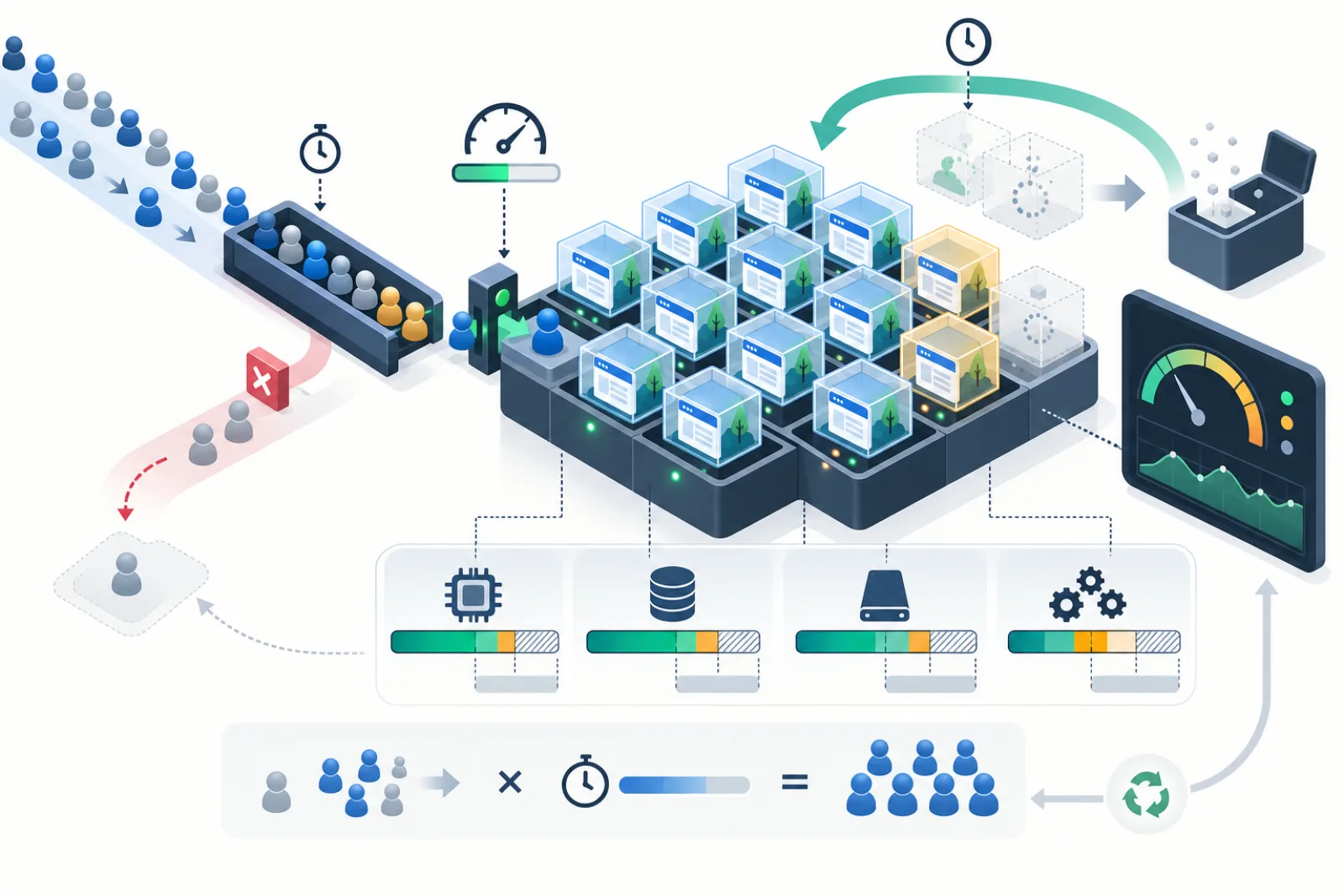
Capacity for a public WordPress plugin demo is driven by concurrent sandboxes, not monthly page views. Estimate launch rate, average session lifetime and cleanup lag; then test the database, PHP workers, storage and background deletion under that concurrency. Put admission limits and headroom in place before promotion traffic arrives.
Start with the concurrency equation
A useful first estimate is concurrent sessions = launches per minute × average occupied minutes. If five visitors launch each minute and a sandbox occupies resources for 30 minutes, expect roughly 150 active sandboxes in steady state. Add the cleanup backlog and a safety factor. This is a planning estimate, not a guarantee: traffic bursts, abandoned sessions and slow provisioning create variance.
| Input | Measure | Why it changes capacity |
|---|---|---|
| Launch arrival rate | Per minute at median and peak | Creates new concurrent sites |
| Occupied lifetime | Launch to verified deletion | Long sessions hold slots |
| Provisioning time | p50, p95 and failures | Consumes workers during bursts |
| Cleanup lag | Expiry to verified absence | Expired sites still consume resources |
| Per-sandbox footprint | Tables, rows, files and cache | Determines storage and database growth |
Profile one sandbox before multiplying
Create a representative demo with the real plugin, dependencies and sample content. Measure database table count and size, uploaded bytes, object-cache keys, PHP memory during launch, queries during first load and any background jobs. Repeat after realistic use. A blank subsite understates capacity for a WooCommerce or media-heavy demo.
Find the first shared bottleneck
Multisite isolation is logical, while many resources remain shared. New subsites increase rows and tables in one database. Visitors compete for PHP workers, database connections, CPU, filesystem metadata operations and cache memory. DNS and TLS setup can also limit how quickly a new hostname becomes usable.
- PHP: measure active/queued workers during simultaneous launch, login and page-render requests.
- Database: inspect connection saturation, lock time, table-open pressure, query latency and backup duration.
- Storage: include uploads, logs, cache, database growth and delayed reclamation.
- Scheduler: ensure cleanup throughput exceeds expiry throughput.
- External services: prevent demo email or HTTP calls from consuming quotas or changing real systems.
Reserve headroom and define admission control
Do not allocate every theoretical slot. Keep headroom for Network Admin, cleanup, backups and normal variance. When the active-plus-provisioning count reaches the safe limit, queue briefly or return a clear try-later response. A controlled refusal is better than admitting a visitor into a half-created site and destabilizing every active demo.
Set separate limits for concurrent sessions, launches per identity/time window, provisioning jobs and cleanup workers. Per-IP limits alone punish offices and mobile carriers that share addresses, so combine signals conservatively and avoid invasive fingerprinting.
Load-test the lifecycle, not only the homepage
Use a staging network with production-like data and infrastructure. Ramp simultaneous launches, follow the automatic-login redirect, perform common plugin actions, extend a subset of sessions, let others expire and verify deletion. Run cleanup during load. Include cached and uncached visits. Stop at predetermined database latency, worker queue or error-rate thresholds.
| Scenario | Pass condition |
|---|---|
| Normal steady state | Provisioning and page latency meet targets with cleanup current |
| Launch burst | Admission control protects existing sessions |
| Cleanup paused | Backlog alert fires before headroom disappears |
| Database slowdown | New launches fail closed without partial sites |
| Recovery | Backlog drains without a second outage |
Turn measurements into an operating budget
Document a maximum safe active count, peak launches per minute, maximum cleanup lag and storage ceiling. Example: if tests support 180 active sites before p95 latency degrades, operate at perhaps 120–140 until real traffic validates the model. The precise margin depends on business risk and infrastructure elasticity; publish the decision and revisit it after plugin, theme, PHP or hosting changes.
Worked sizing example
Suppose a campaign produces eight launches per minute for 20 minutes, while normal traffic is two per minute. The median session lasts 25 minutes, but the 95th percentile occupies 40 minutes. Using the peak and longer duration gives 320 potentially occupied sites before cleanup lag. Add 15 minutes of tolerated cleanup delay and the exposure rises to 440. If the tested safe ceiling is 250, the campaign needs a lower launch rate, shorter lifetime, more capacity or an admission queue—it cannot be solved by optimistic averages.
Plan storage and database growth over time
Capacity is not only simultaneous PHP work. Multiply the p95 post-use database and upload footprint by the maximum active plus cleanup-backlog count. Add transaction logs, backups and object-store versioning, which may retain deleted data. Track database table count because each Multisite subsite typically adds site-specific tables. Test backup and restore duration at projected scale; a demo system that runs quickly but cannot be recovered inside its objective is under-capacity.
Make overload behavior part of the product
Give visitors a stable explanation, a short retry interval and no broken subdomain when admission is closed. Avoid reserving resources before a visitor is likely to use them. Expire abandoned provisioning claims quickly, but do not shorten active sessions without warning. Monitor the ratio of rejected launches to successful evaluations so capacity controls protect reliability without silently erasing demand.
Define the complete sandbox workload
Measure provisioning, first login, editor navigation, plugin actions, media uploads, resets, expiry and cleanup. A cached homepage benchmark misses database creation, dependency activation, generated files and destructive teardown. Record the exact demo product, starter content and permitted user actions.
Separate interactive latency from background completion. A visitor may enter quickly while provisioning continues, but only if every unfinished dependency is represented honestly and cannot corrupt the session.
Calculate concurrency from arrival and lifetime
Estimate average launches per minute multiplied by average active lifetime, then model bursts and high-percentile lifetime. Add cleanup delay because expired sandboxes still consume capacity until verified deletion. Repeat-launch abuse and abandoned sessions change the distribution.
Use measured concurrency rather than maximum signups. Keep assumptions, confidence and observation window beside the number.
Profile one sandbox by resource layer
Capture peak and steady CPU, PHP occupied seconds, database connections and storage, memory, files/inodes, object-cache keys, background jobs and external calls. Repeat with the heaviest allowed workflow. One idle subsite does not reveal the cost of imports, builders or image processing.
Record original and cleanup residues so per-sandbox cost represents the full lifecycle.
Model PHP worker demand
Group provisioning, frontend, admin, REST/AJAX and cleanup requests by occupied seconds. Workers can saturate while CPU is moderate because they wait on database, filesystem or remote services. Reserve capacity for platform administration and cleanup so demo traffic cannot prevent its own reclamation.
More workers require memory and downstream connection headroom; load-test before raising limits.
Model database capacity
Measure schema or table creation, option writes, starter-content import, query latency, locks, temporary tables and connection peaks. Multisite adds rows and tables according to architecture. Track growth and deletion lag, not only database file size immediately after cleanup.
Use bounded indexed queries in session listings and cleanup reconciliation. An operator screen must remain usable during overload.
Model filesystem and object storage
Count originals, derivatives, plugin-generated files, caches, exports and temporary archives. Include object versions and deletion markers where versioning applies. Storage reclaimed in WordPress may not equal billed bytes until lifecycle retention expires.
Validate sandbox-specific paths and prefixes. Shared directories make destructive cleanup unsafe and capacity attribution unreliable.
Account for cache behavior
Many unique sandbox hosts or paths can produce low page-cache reuse and large cache-key growth. Measure cold and warm sessions separately. Ensure cache keys include site identity and authorization; cross-sandbox cache leakage is a security defect.
Plan invalidation and expiration so deleted environments do not leave indefinite objects.
Budget DNS, TLS and routing
Per-sandbox subdomains may depend on wildcard DNS and certificates; path-based demos depend on correct proxy and cookie isolation. Measure first connection, certificate coverage and routing propagation. A fast WordPress provision is not a usable launch if the hostname fails.
Test from external networks and through certificate renewal, while avoiding per-launch certificate issuance that cannot scale.
Set admission controls
Define maximum active sandboxes, launches per visitor/network/account, queue length and retry delay. Reject or queue before provisioning begins when capacity is exhausted. Give visitors a truthful status without exposing infrastructure detail.
Reserve capacity for cleanup, health checks and administrators. Never allow launch traffic to consume the final worker or database connection.
Design fair scheduling
Prevent one product, source or automated client from monopolizing the pool. Use per-identity and global limits with abuse-aware signals. NAT and shared offices make IP-only limits unreliable, so combine controls carefully and provide an accessible retry path.
Log decisions without retaining unnecessary personal data.
Plan lifetime and idle expiry
Maximum lifetime bounds resource occupancy; idle expiry can reclaim abandoned sessions earlier. Define activity accurately and warn before termination. Do not extend lifetime indefinitely because a background poll appears active.
Test browser sleep, reconnect and explicit extension. Expiry must revoke access even if cleanup is delayed.
Reserve cleanup throughput
Capacity is stable only when verified cleanup rate exceeds expiry rate over sustained periods. Measure average and high-percentile deletion, retry volume and quarantine. Size workers and scheduler cadence to drain a burst while interactive service remains healthy.
Alert on oldest overdue sandbox and residual resources, not merely job success.
Load-test realistic mixtures
Combine launches, active editing, resets, media uploads, expiry and cleanup in production-like proportions. Include cold caches and heavy supported plugins. Ramp gradually and stop at safety thresholds for queue, database latency, memory or errors.
Do not run destructive load tests against production customer data or send real email and webhooks.
Test failure and recovery capacity
Simulate database slowdown, object-store throttling, scheduler pause, worker restart and external dependency failure. Confirm admission control protects the platform, access expires, cleanup resumes idempotently and backlog drains within its objective.
Recovery may demand more capacity than steady state; preserve headroom for it.
Build a capacity worksheet
| Resource | Per sandbox evidence | Shared limit | Safety trigger |
|---|---|---|---|
| PHP | Occupied seconds by route | Workers and memory | Queue percentile |
| Database | Bytes, queries, connections | IOPS and connections | Latency/lock threshold |
| Storage | Current and retained bytes | Disk, inode, bucket budget | Verified free headroom |
| Cleanup | Duration and retries | Worker throughput | Oldest overdue age |
Worked case: cleanup becomes the bottleneck
A campaign doubles launches. Interactive demos remain fast, but object deletion is throttled and expired sandboxes accumulate. Storage and database tables rise until new provisioning fails. The original plan counted active visitors but not cleanup lag.
The team pauses admissions before exhaustion, reserves cleanup workers, adds bounded retries and reports verified deletion. Backlog drains before limits reopen.
Worked case: image processing exhausts memory
Average demos are light, but users can upload large images. Several simultaneous decodes kill PHP workers. The team validates dimensions and bytes, caps media concurrency and includes peak image memory in the per-sandbox profile.
Launch capacity is set from the heaviest permitted workflow, not the idle dashboard.
Monitor the operating envelope
Track active, provisioning, expiring, cleaning and quarantined counts; launch and rejection rate; p95 readiness; PHP queue; database latency; free storage/inodes; cleanup throughput; oldest overdue age; and access after expiry. Annotate releases and campaigns.
Alert on trend and consequence with a named owner. A capacity dashboard without admission action is informational only.
Scale vertically and horizontally with evidence
Vertical resources can relieve a proven CPU, memory or IO ceiling. Horizontal application nodes require shared database, storage, cache, scheduler ownership and routing correctness. Cleanup and provisioning locks must work across nodes.
Test failover and duplicate scheduler invocation before treating more nodes as more capacity.
Definition of done
The operating envelope is based on full-lifecycle tests, includes high-percentile resource use and cleanup lag, preserves recovery headroom, and has admission controls before exhaustion. DNS, TLS, cache isolation and expiry work under load. Dashboards report verified reclamation, failure drills drain backlog, and scaling/rollback decisions are documented.
Forecast campaigns and product changes
Marketing bursts alter launch arrival while plugin releases alter per-sandbox cost. Build scenarios for normal, campaign, bot and outage conditions. Rebenchmark when starter data, dependencies, builders or allowed uploads change.
Capacity limits should be configuration with owners, not a permanent number copied from an old test.
Control cost per successful demo
Measure infrastructure, storage, object requests and external-service cost divided by verified usable sessions. Include failed provisions and cleanup retries. A higher launch limit can reduce conversion if visitors enter broken or slow environments.
Use the metric for planning, not to justify collecting unnecessary visitor data.
Plan backup and recovery load
Backups, restores and database maintenance compete with demos. Schedule them deliberately and test a restore while preserving interactive service. Reserve IO, storage and workers for incident recovery.
Do not exclude backup bytes from storage planning merely because they live on another service.
Set release acceptance thresholds
Require provisioning and login percentiles, active-session responsiveness, reset/expiry correctness, cleanup throughput and zero cross-sandbox leakage under the tested mix. Stop a release when resource use exceeds the prior envelope without an approved capacity change.
Keep the benchmark workload and result artifact reproducible.
Use gradual limit changes
Raise concurrency in small steps while watching queue, memory, database and cleanup age. Lower admissions early during degradation; waiting for disk or connections to exhaust makes recovery slower. Communicate retry timing honestly.
Record why and when limits changed, and automatically expire emergency overrides.
Review capacity weekly during growth
Compare arrivals, active lifetime, rejection, resource percentiles and verified reclamation. Investigate drift before changing limits. A rising lifetime might reflect a better demo or a cleanup defect; the response differs.
Annotate campaigns, incidents and releases so the trend remains interpretable.
Segment capacity by demo product
A simple settings plugin and a builder with media imports have different CPU, storage and cleanup profiles. Maintain per-product weights or separate pools when evidence warrants it. One heavy product should not consume the entire shared envelope unnoticed.
Rebenchmark dependencies and starter content with every meaningful product release.
Plan database maintenance
Deleted Multisite tables, logs and transient rows may not immediately reduce physical storage. Include optimization, backups and replication lag in the operating model. Schedule maintenance without starving active demos or cleanup workers.
Measure usable headroom and restore time, not only the database file displayed by a host panel.
Control observability cost
Per-request traces and high-cardinality sandbox labels can become expensive. Keep aggregate service metrics continuously and sample detailed diagnostics during incidents. Retain enough identity to correlate lifecycle without logging visitor content or tokens.
Ensure monitoring remains available during the exact overload it must explain.
Define degraded modes
During dependency or capacity pressure, pause new launches, reduce optional starter data or queue visitors while preserving active sessions and cleanup. Never silently provide a partially provisioned environment. State expected wait and retry path.
Test entry and exit so the platform does not remain degraded after recovery.
Protect administrative capacity
Reserve worker, database connection and routing access for operators, health checks and emergency cleanup. Rate-limit public endpoints separately. An overload that blocks Network Admin removes the team’s safest recovery surface.
Verify the reserve under mixed launch and cleanup load.
Maintain a capacity decision record
Store workload version, measurements, assumptions, chosen limits, rejected alternatives, safety triggers, approver and rollback. Review when infrastructure or pricing changes. This prevents future operators from raising a number without understanding the limiting layer.
Keep one healthy and one overload test result as reference.
Plan for bot and abuse traffic
Measure rejected requests separately from successful provisioning. Apply layered rate limits before expensive work and use challenges only where they do not block legitimate accessibility or shared networks. A request rejected after database creation still consumes capacity.
Monitor repeat tokens, automation patterns and failed redemptions without retaining unnecessary personal data.
Test regional latency and dependency placement
Visitors may reach the launch endpoint far from the database or object store. Measure DNS, TLS, routing, provisioning and editor requests from important regions. Do not add application nodes where shared data latency makes each request slower.
Choose topology from the full demo journey and test failover between nodes.
Coordinate capacity with product promises
Maximum lifetime, upload limits, available features and queue behavior should be visible before launch. Marketing should not promise instant unlimited demos when the safe operating envelope requires admission. Use real conversion and completion data to choose tradeoffs.
When limits tighten during an incident, preserve existing sessions and communicate the temporary state honestly.
Run a quarterly capacity review with engineering, operations and product. Reconcile forecast launches with observed completion, abandonment and resource cost; confirm cleanup and recovery reserves; and approve any change to lifetime, feature scope or concurrency. This shared record prevents a campaign setting from silently exceeding the platform’s tested envelope.
Retire old benchmark results when the infrastructure or product payload changes. Historical numbers remain context, not authorization for current limits.
Keep a synthetic full-lifecycle canary inside the capacity budget. It should launch safely, complete one representative action, expire and reconcile every resource class. Exclude it from product analytics and prevent overlap. A canary failure reduces confidence in available capacity even when visitor latency looks healthy, because delayed cleanup and broken authorization consume the recovery reserve later.
Use canary duration and resource deltas as early warnings, not as the only capacity model. Real visitors may use heavier plugins, upload larger permitted assets or remain active longer. Compare the canary with sampled production aggregates that exclude content and personal data.
When capacity approaches a trigger, reduce admissions before active sandboxes degrade. Preserve enough resources for access revocation, cleanup, monitoring and Network Admin. Document who may reopen the pool and which verified metrics must recover first.
How WPStack Sandbox Manager fits
WPStack Sandbox Manager 0.3.2 is described as provisioning isolated Multisite subsites, enforcing maximum lifetime, cleaning up expired sites/users and limiting concurrent or repeated launches. Those controls provide the mechanisms needed for an operating envelope.
They do not supply hosting capacity. The product is self-hosted; DNS, SSL, compute, database performance, storage and monitoring remain yours. Its Community edition supports one configured demo product. Benchmark the exact installed release and demo payload before setting public limits.
Related WPStack guides
Frequently asked questions
How many WordPress demo sandboxes can one server run?
There is no universal number. Measure per-sandbox cost and identify the first saturated shared resource under lifecycle load.
Does shortening session time always increase capacity?
Usually, but only when deletion keeps pace. Expired sites that wait in a backlog still occupy capacity.
Should I autoscale PHP workers?
Only with database, memory and cleanup limits. Scaling one layer can move the bottleneck and increase failure cost.
What should happen when capacity is full?
Protect active sessions, reject or queue new launches clearly, and expose a retry path. Avoid partial provisioning.
Which metric predicts trouble earliest?
Use active plus provisioning plus expired-not-deleted sessions against the tested safe ceiling, alongside cleanup backlog age.
References
- WordPress Plugin Handbook: WP-Cron
- Hooking WP-Cron into a system scheduler
- WP-CLI site list
- WP-CLI cron event commands

Aditya Bhimrajka is a technology entrepreneur, product strategist, and software solutions expert with over a decade of experience building scalable web and mobile applications. His expertise spans SaaS, AI, cloud technologies, custom software development, and digital transformation. Passionate about solving real-world business challenges through technology, Aditya shares practical insights on WordPress, plugins, software development, startup growth, product strategy, and emerging technologies. At WPStack, he writes actionable, experience-driven content that helps developers, businesses, and website owners build secure, high-performing, and future-ready WordPress solutions.