
How to Create a White-Label WordPress Plugin Demo Experience
White-labelling a WordPress plugin demo is not simply replacing one logo. The visitor encounters a chain of product surfaces: the launch page, URL, loading state, automatic login, wp-admin, session controls, emails or notices, expiry screen, documentation, and the route back to pricing.
A coherent experience applies the plugin company’s identity across that chain without pretending WordPress itself is proprietary. The objective is continuity and trust, not cosmetic concealment.
Key takeaways
- Map every visitor-facing surface before changing styles.
- Use a branded domain and consistent navigation where infrastructure permits.
- Keep automatic access and session limits clearly explained.
- Do not hide WordPress or third-party notices that affect evaluation honesty.
- Treat white-labelling as an operational feature that must survive updates.
Table of contents
- Map the complete journey
- Choose the domain strategy
- Brand the catalogue and launch state
- Handle wp-admin carefully
- Make session status part of the brand
- Align documentation and support
- Maintain white-label customisation
- Frequently asked questions
Map the complete journey
Document the steps from a product page to sandbox deletion. Include launch controls, capacity errors, provisioning states, redirects, wp-admin, countdown, extension, expiry, return links, documentation, and support.
A logo change on the catalogue will feel incomplete if the login exchange, favicon, error message, or expiry screen abruptly switches to another identity.
Choose the domain strategy
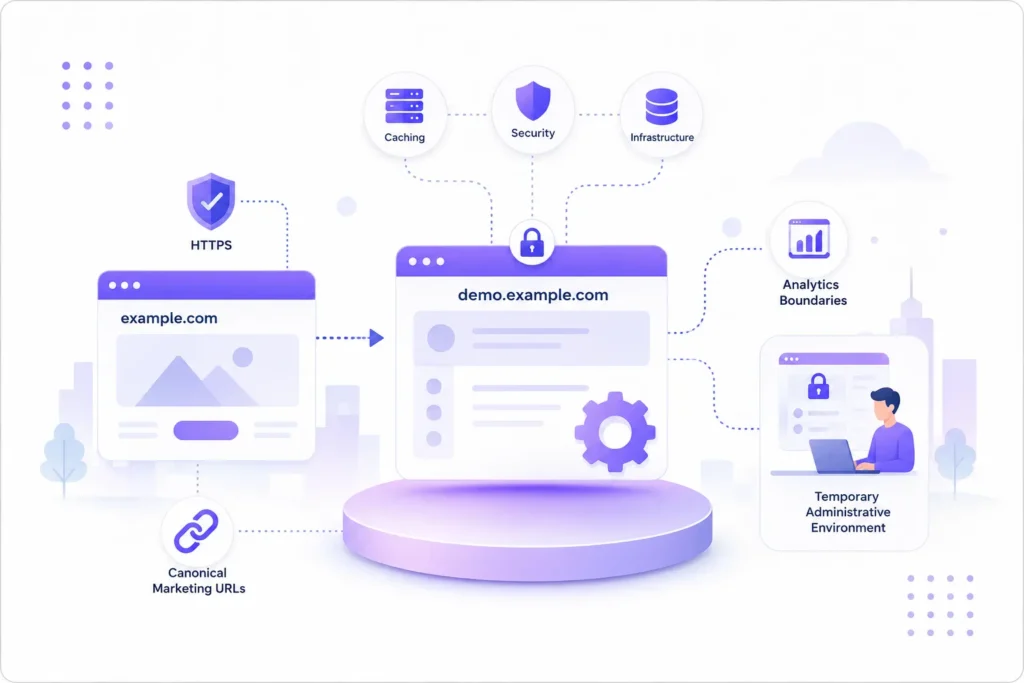
A subdomain such as demo.example.com creates a clear relationship with the main product site while allowing separate caching, security, and infrastructure rules. Configure HTTPS, canonical marketing URLs, and analytics boundaries deliberately.
Avoid exposing internal hostnames or unpredictable site addresses when a controlled front door can route visitors into sessions. Explain when the browser is moving into a temporary administrative environment.
Brand the catalogue and launch state
Use the same typography, colour, button hierarchy, and product naming as the primary site. Keep the product cards informative: state the plugin, purpose, version or availability, and what the visitor will test.
Provisioning feedback should be specific enough to reassure the visitor without exposing server details. Provide a retry or support path when creation fails.
Handle wp-admin carefully
Branding should orient the visitor, not distort the demonstrated plugin. Remove unrelated menus and notices, add a clear session indicator, and preserve controls that the customer would genuinely see after installation.
If the real product uses standard WordPress patterns, showing those patterns is evidence of platform fit. Do not redesign the plugin solely for the sandbox and create a misleading difference from production.
Make session status part of the brand
A countdown, extension control, and expiry message are customer communication. Use plain language, predictable placement, accessible contrast, and clear consequences.
Explain whether changes are retained, whether a new session starts from scratch, and how to return to product details. A graceful expiry screen is more trustworthy than a sudden failed request.
Align documentation and support
Link help content for the specific workflow and keep the support route appropriate to a demo visitor. Distinguish presales questions from technical support owed to customers.
Use consistent product names and plan labels across the demo, documentation, pricing, and checkout. Small naming differences create doubt about which edition is being tested.
Maintain white-label customisation
Treat logos, colours, copy, URLs, and injected controls as versioned configuration. Test them after WordPress, theme, builder, and plugin updates.
Avoid brittle CSS that depends on unstable wp-admin selectors. Prefer supported hooks and scoped styles, and verify keyboard and mobile behaviour after every significant change.
Create a white-label content inventory
Record every visitor-facing string and asset in one maintainable inventory: product name, catalogue description, launch button, provisioning message, favicon, automatic-login transition, session label, extension message, expiry copy, documentation links, support route, return URL and privacy notice. Assign an owner and test the inventory whenever a release changes the journey.
Keep system messages factual. White-labelling should not erase evidence that the visitor is entering a temporary WordPress installation, that work will be deleted, or that specific functions are restricted. Clear operational language strengthens the brand more than an elaborate loading animation.
Where the demo uses third-party services, decide whose identity belongs in the flow and why. Do not disguise an external authorisation screen or legal notice. Consistency should never create a false impression about who processes data or supplies a dependency.
Preview transactional states that are easy to overlook: invalid launch, capacity reached, expired token, failed dependency, extension refused, session expired and cleanup delayed. Each state needs the same naming, tone, accessibility and return path as the successful journey. These screens are where brand credibility is tested most sharply.
Create a White-Label Plugin Demo Experience That Builds Trust
Contact WPStack to transform your WordPress plugin demo into a consistent, professional customer journey—from the branded launch page and automatic login to wp-admin controls, session countdowns, expiry screens, documentation, support links, and the return path to pricing. We can help you identify branding gaps, remove confusing transitions, improve session communication, and ensure the demo remains honest, accessible, and representative of the plugin customers will actually receive.
For businesses that need capabilities beyond standard configuration, WPStack also provides custom plugin development for advanced white-labelling, branded demo portals, automated sandbox provisioning, custom session controls, analytics, webhooks, role-based restrictions, product catalogues, CRM integrations, licensing workflows, and tailored customer onboarding. Build a maintainable demo system that reflects your brand, survives WordPress updates, and supports your plugin sales process.
Frequently asked questions
No. It means presenting a coherent product-company experience while remaining honest about the WordPress platform and third-party components.
A dedicated branded subdomain is often easier to operate and secure while maintaining a clear connection to the main site.
The Community edition uses standard WPStack branding. White-labelling is a Pro capability.
Only where necessary for session controls and safety. The demonstrated product itself should remain representative of the real installation.
Try WPStack Sandbox Manager
Review the complete product details, experience the live sandbox, or download the free Community edition. Pro adds unlimited products, white-labelling, analytics, webhooks, import/export, and commercial updates.

Aditya Bhimrajka is a technology entrepreneur, product strategist, and software solutions expert with over a decade of experience building scalable web and mobile applications. His expertise spans SaaS, AI, cloud technologies, custom software development, and digital transformation. Passionate about solving real-world business challenges through technology, Aditya shares practical insights on WordPress, plugins, software development, startup growth, product strategy, and emerging technologies. At WPStack, he writes actionable, experience-driven content that helps developers, businesses, and website owners build secure, high-performing, and future-ready WordPress solutions.
1 Comment
Comments are closed.
WPStack Sandbox Manager Community vs Pro
August 6, 2026 at 1:31 pm
“ […] Previous: How to Create a White-Label WordPress Plugin Demo Experience […] “