
How to Create a WordPress Plugin Demo Site That Resets Automatically
A useful WordPress plugin demo should give every visitor a predictable starting point and remove the environment when the evaluation ends. That requires more than cloning a site. The system must coordinate provisioning, authentication, session state, dependencies, restrictions, expiration, and deletion.
This guide explains the architecture and operating decisions behind an automatically resetting WordPress plugin demo. It uses WordPress Multisite as the foundation because a network can create temporary subsites while centralising product configuration and lifecycle controls.
Key takeaways
- Use separate temporary sites instead of allowing visitors to share one mutable demo.
- Treat automatic login tokens as short-lived, single-use credentials.
- Store session state centrally and make cleanup idempotent.
- Limit launches, email, external requests, uploads, and resource-heavy actions.
- Test the complete lifecycle under failure, not only the successful launch path.
Table of contents
- Define the demo contract before building
- Use Multisite as the lifecycle boundary
- Provision from a known product definition
- Create safe automatic access
- Track time independently of the browser
- Make cleanup idempotent
- Protect the shared network
- Test the whole lifecycle
- Frequently asked questions
Define the demo contract before building
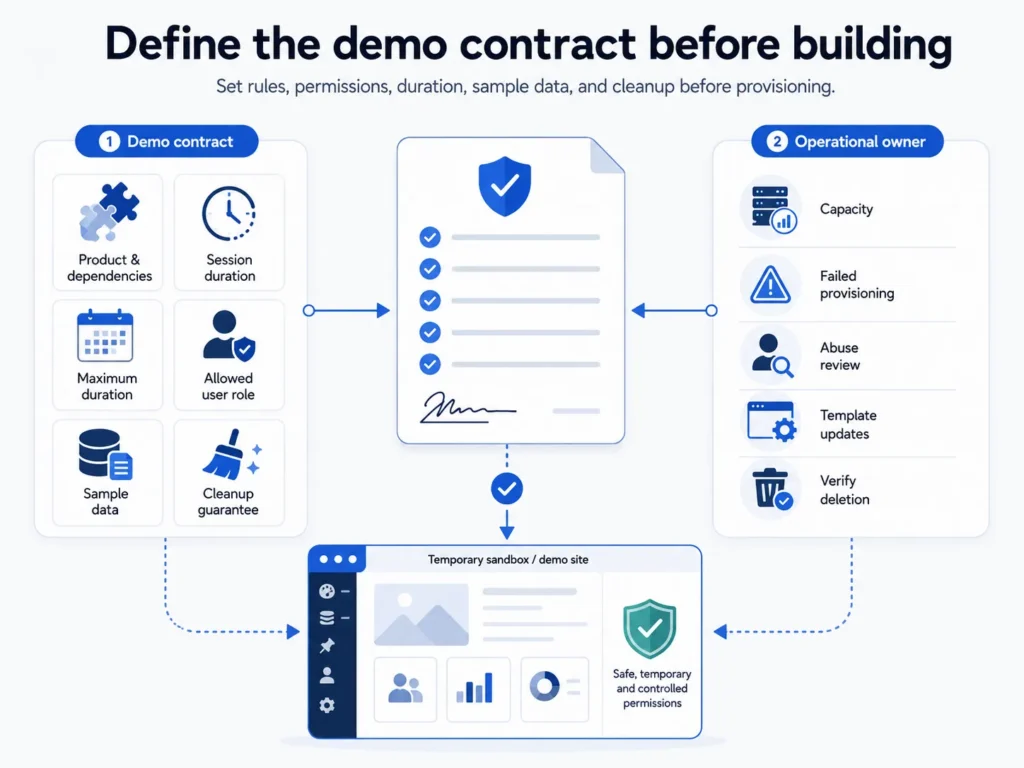
Begin by defining exactly what the visitor may do. Identify which plugin is demonstrated, which dependencies it needs, what sample data appears, how long the session lasts, whether an extension is permitted, and what must be removed afterward. A vague contract produces inconsistent sites and unsafe permissions.
Also define the operational owner. Someone must decide capacity, monitor failed provisioning, review abuse, update the template state, and verify deletion. Automation reduces repetitive work; it does not remove responsibility for the network.
- Product and dependency list
- Initial session duration
- Maximum duration
- Allowed user role
- Required sample data
- Cleanup guarantee
Use Multisite as the lifecycle boundary
WordPress Multisite gives every demonstration its own posts, options, uploads path, and site-level tables while keeping plugin code and network administration centralised. A temporary subsite becomes a practical lifecycle boundary: create it for one evaluation and delete it when the session ends.
This is useful isolation, not the same as a virtual machine or operating-system container. Network-activated code, the underlying filesystem, database server, object cache, and PHP workers remain shared. Plugins selected for public demos must therefore be reviewed with Multisite and shared-resource behaviour in mind.
Provision from a known product definition
A product definition should identify the primary plugin, required dependencies, landing location after login, session duration, extension policy, and any setup routine used to create sample content. Keep this configuration explicit rather than scattering assumptions through site-creation hooks.
Provisioning should be repeatable. Given the same product definition, two new demonstrations should start with materially the same settings and data. If provisioning fails halfway through, record the failure and remove the partial site rather than presenting it to the visitor.
Create safe automatic access
Do not distribute a reusable administrator password. Generate a short-lived, single-use login token associated with the temporary site, session, and user. Consume the token on first use, establish the WordPress session, and redirect the visitor to the configured product screen.
The temporary user should receive the least privilege compatible with the demonstration. Some plugins require administrator capabilities to show their full interface, but that choice must be explicit. Remove unrelated menus and prevent access to network administration regardless of the site-level role.
Track time independently of the browser
A visible countdown is a user-interface feature; the server remains the authority. Store the creation time, expiry time, extension history, status, and site identifier centrally. Every extension must be validated against the product policy and maximum permitted duration.
Do not rely only on a JavaScript timer or a scheduled event created inside the temporary subsite. A visitor can close the browser, and cron may run late. Server-side checks should reject expired sessions, while a network cleanup worker repeatedly removes environments that have passed their expiry.
Make cleanup idempotent
Cleanup can be triggered more than once by a cron event, an administrator, a request-time expiry check, or a retry after a timeout. The deletion operation must therefore be safe when the site or user is already gone. Record state transitions so administrators can distinguish active, expiring, deleted, and failed sessions.
Use bounded batches instead of scanning and deleting an unbounded number of sites in one request. Log failures without exposing private visitor data, and provide a way for an administrator to retry or inspect cleanup that does not complete.
Protect the shared network
Block or safely redirect outgoing email from temporary sites so test actions cannot contact real customers. Restrict arbitrary external HTTP requests where the demonstrated product does not require them. Apply per-visitor launch limits and ensure uploaded files disappear with the site.
Capacity still depends on the server. Measure database growth, filesystem use, PHP concurrency, object-cache pressure, and cleanup throughput. Set a practical active-session ceiling before promotion sends a burst of visitors to the demo.
Test the whole lifecycle
Test successful provisioning, invalid products, dependency failure, duplicate launch requests, reused login tokens, expired tokens, extension limits, manual expiration, delayed cron, partial deletion, and concurrent launches. Confirm that a deleted demo can no longer authenticate or access its uploads.
Run the test from a clean visitor browser on desktop and mobile. The public catalogue, launch feedback, redirect, admin landing page, session controls, and expiry message are all part of the product experience—not merely infrastructure details.
Frequently asked questions
A single-site installation can be copied through external provisioning, but WordPress Multisite provides a more direct native foundation for centrally managed temporary subsites.
It removes the site-level database tables and site records through WordPress, but you should verify uploads, custom tables, scheduled jobs, and external data created by demonstrated plugins.
Only when the demonstrated workflow genuinely requires administrator capabilities. Use the least-privileged role that still presents an honest demonstration.
Choose a duration long enough to complete the core workflow and short enough to protect capacity. Provide bounded extensions when longer evaluation is reasonable.
Try WPStack Sandbox Manager
Explore the WPStack Sandbox Manager product page, launch a session on the live demo, or start with the free Community edition. The Community edition supports one configured demo product; Pro adds unlimited products, white-labelling, analytics, webhooks, import/export, and commercial updates.

Aditya Bhimrajka is a technology entrepreneur, product strategist, and software solutions expert with over a decade of experience building scalable web and mobile applications. His expertise spans SaaS, AI, cloud technologies, custom software development, and digital transformation. Passionate about solving real-world business challenges through technology, Aditya shares practical insights on WordPress, plugins, software development, startup growth, product strategy, and emerging technologies. At WPStack, he writes actionable, experience-driven content that helps developers, businesses, and website owners build secure, high-performing, and future-ready WordPress solutions.
4 Comments
Comments are closed.
WPStack Sandbox Manager Launch | WPStack
July 29, 2026 at 10:48 am
“ […] Next: How to Create a WordPress Plugin Demo Site That Resets Automatically […] “
Let Customers Test a WordPress Plugin Before Buying
July 30, 2026 at 1:02 pm
“ […] Previous: How to Create a WordPress Plugin Demo Site That Resets Automatically […] “
Build a Disposable WordPress Sandbox with Multisite
July 31, 2026 at 1:02 pm
“ […] Pillar guide: How to Create a WordPress Plugin Demo Site That Resets Automatically […] “
How Plugin Demos Support WordPress Plugin Sales
August 4, 2026 at 1:00 pm
“ […] Pillar guide: How to Create a WordPress Plugin Demo Site That Resets Automatically […] “