
WordPress Plugin Settings Architecture: Options, Validation, and Defaults
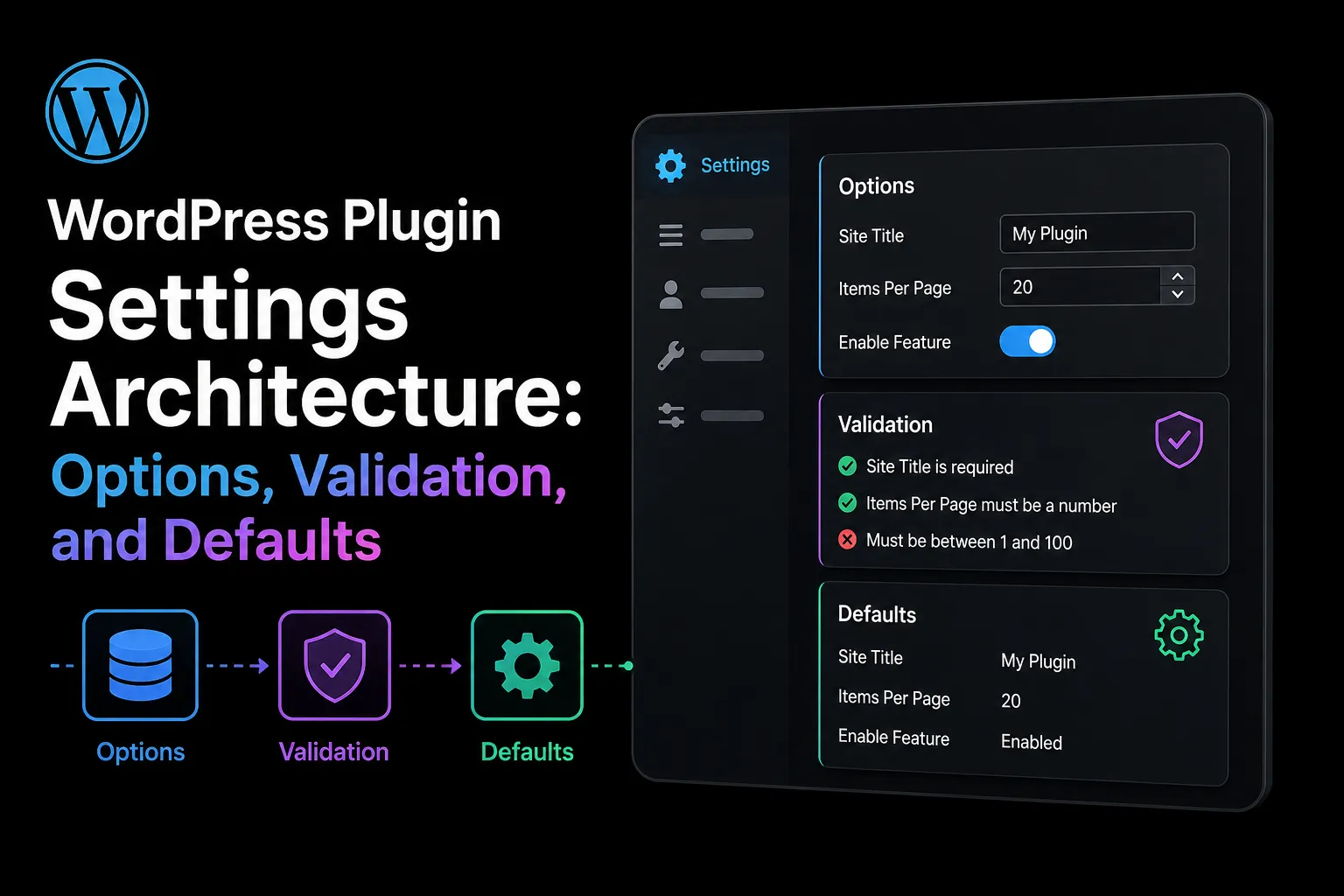
Settings often look like one of the simplest parts of WordPress plugin development. A plugin may begin with a checkbox and save button. Over time, it may gain several administration screens, multisite support, background workers, REST API endpoints, imports, and years of upgrade logic.
Without a clear architecture, settings become scattered across the codebase. One feature may call get_option() directly, another may apply a different default, and an API endpoint may accept values that the administration screen rejects. This makes the plugin harder to test, secure, and upgrade.
A small settings schema prevents this problem. It gives every setting a defined structure and ensures that forms, APIs, background jobs, and migrations follow the same rules. The practical outcome is predictable configuration behaviour that can be verified on staging and included in a repeatable release process.
Design a Settings Schema Before Building the Form
The settings form should not be the source of truth. Begin by defining a schema that describes every supported setting.
For each setting, record its key, data type, default value, allowed values, required capability, storage scope, sensitivity, autoload behaviour, and migration history. You may also define validation and sanitization callbacks and whether the value can be exposed through an API.
Once the schema exists, the administration interface becomes only one consumer. REST endpoints, WP-CLI commands, imports, background workers, and upgrade routines should use the same definitions. This reduces duplicated logic and simplifies automated testing.
A central schema also makes future development safer. When a new interface or integration is introduced, developers can reuse the existing settings rules instead of creating another collection of validation callbacks, defaults, and permission checks.
Reject Unknown Keys During Bulk Updates

Bulk updates may contain valid settings together with old, unsupported, or intentionally crafted fields.
Always compare incoming keys with the current schema and reject anything the plugin does not recognize. Do not save additional fields simply because they are included in an array.
An outdated client may continue sending settings removed in a later release, while a crafted request may attempt to persist unexpected values. Strict key validation keeps stored configuration aligned with the installed code and makes debugging and migrations more reliable.
Rejecting unknown keys also prevents configuration arrays from accumulating abandoned values. These unused values may appear harmless, but they can make support investigations difficult and may conflict with settings introduced in a future version.
Choose Storage According to Access Patterns
There is no universal rule that every plugin setting must use one option or that every value must be stored separately.
A small, cohesive configuration can work well inside one namespaced option, such as wpstack_plugin_settings. Separate options may be better when values differ significantly in size, sensitivity, ownership, update frequency, or autoload requirements.
Do not mix runtime data with configuration. Logs, queues, caches, processing results, and unbounded arrays are better stored in custom tables, transients, dedicated storage, or a queue system.
Autoload behaviour should match the request path. A small option required on most front-end requests may benefit from autoloading. A large admin-only configuration usually should not load on every request.
Autoloading every plugin option can increase the amount of data WordPress loads during each request. This becomes particularly expensive when an option contains large arrays or configuration used only inside the administration area.
The Autoloaded Options Manager can help identify option size, ownership, and risk when existing websites already contain excessive autoloaded data.
Apply Defaults Without Rewriting on Every Request
Defaults should make missing settings predictable without creating unnecessary database writes.
A reliable pattern is to load the stored configuration and merge it with schema-defined defaults at read time. Newly introduced settings then receive usable values even before the site saves the updated configuration.
Activation may persist defaults when the product requires the option to exist immediately. However, avoid calling update_option() on every request. Repeated writes invalidate caches, increase database work, and may create contention on busy sites.
When a default changes, decide whether it applies only to new installations or should migrate existing sites. A new security default may suit fresh installations but disrupt established workflows. Silent behavioural changes can be more damaging than visible migrations.
The decision should be documented in the migration plan and tested against both new installations and upgraded sites. This prevents users from experiencing unexpected changes after a routine plugin update.
Separate Capability, Validation, Sanitization, and Escaping
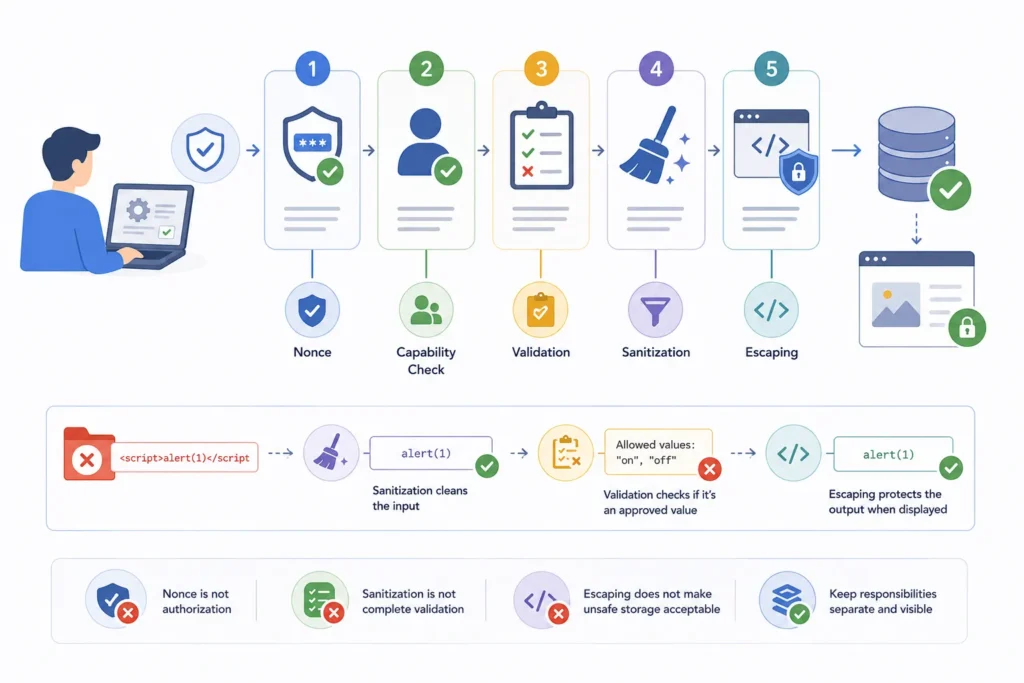
Secure settings handling requires several independent checks.
A nonce verifies request intent and helps prevent cross-site request forgery. It does not prove that the current user has permission to change a setting. A capability check authorizes the action and may differ between a single site and an entire multisite network.
Validation confirms that the submitted value is permitted. An enum must match one of the explicitly allowed values, while a number may require minimum and maximum limits.
Sanitization normalizes accepted input by trimming whitespace, converting data types, or cleaning ordinary text. Escaping protects the output context when a value is displayed in HTML, placed in an attribute, or returned in another format.
Keep these responsibilities visible. A nonce is not authorization, sanitization is not complete validation, and escaping does not make unsafe storage acceptable.
For example, sanitize_text_field() may clean a submitted string, but it cannot confirm that the value belongs to an approved list. An enum must still be checked against its explicitly allowed values.
Protect Sensitive Settings
API keys, access tokens, private endpoints, and credentials require stricter handling than ordinary preferences.
Never return secrets through general settings endpoints. In the administration screen, show only a masked indication that a secret exists. Provide separate replace and delete actions protected by the correct capability, nonce, and validation rules.
A replacement workflow is safer than displaying the stored credential. Also exclude sensitive values from logs, exports, support bundles, and error messages.
Developers should also review whether sensitive settings can accidentally appear in debugging tools, database exports, REST API responses, or generated diagnostic reports.
Plan Versioned Settings Migrations
A durable settings architecture must support change. Add a settings schema version and create migrations for renamed keys, changed types, split options, combined options, and removed fields.
Each migration should be safe to run more than once. Update the stored version only after success. Test fresh installations, multi-version upgrades, multisite behaviour, and interrupted updates with realistic staging data.
Idempotent migrations are especially important because an upgrade process may stop because of a timeout, server restart, deployment problem, or database error. Running the migration again should continue safely without creating duplicate or corrupted settings.
Implementation Checklist
Define each setting’s type, default, scope, capability, and owner. Reject unknown keys. Keep growing data out of options. Review autoload according to access patterns. Version settings migrations. Separate capability checks from validation, sanitization, and escaping. Protect secrets with masked replacement workflows. Test the release package on staging.
Build a Reliable WordPress Plugin Settings Architecture
Plugin settings should remain consistent across admin forms, REST APIs, WP-CLI commands, background jobs, imports, and future upgrades.
A centralized schema, strict validation, predictable defaults, controlled autoloading, protected secrets, and versioned migrations help prevent configuration errors and security issues.
WPStack provides custom plugin development and architecture review services to help businesses build secure, maintainable, and scalable WordPress settings systems that are easier to test, extend, and upgrade. Planning a new plugin or struggling with scattered and inconsistent settings? Contact WPStack today and discuss your requirements with an experienced WordPress development team.
Frequently Asked Questions
Use one namespaced option for a small, cohesive configuration. Separate values when size, sensitivity, update frequency, ownership, or autoload needs differ materially.
Only when they are small and needed on most requests. Large, admin-only, or rarely used settings usually should not load globally.
No. It normalizes text but does not prove that a value belongs to an allowed set. Validate it against the explicit enum.
Show only a masked indication that a key exists. Provide protected replace and delete actions instead of revealing the stored credential.

Aditya Bhimrajka is a technology entrepreneur, product strategist, and software solutions expert with over a decade of experience building scalable web and mobile applications. His expertise spans SaaS, AI, cloud technologies, custom software development, and digital transformation. Passionate about solving real-world business challenges through technology, Aditya shares practical insights on WordPress, plugins, software development, startup growth, product strategy, and emerging technologies. At WPStack, he writes actionable, experience-driven content that helps developers, businesses, and website owners build secure, high-performing, and future-ready WordPress solutions.
Post a Comment