
Designing WordPress Plugins for Multisite

WordPress Multisite is not simply one larger website. It is a network of sites sharing one installation and codebase while maintaining separate content, settings, users, and database tables.
A single-site plugin can fail in Multisite when it assumes the current site represents the whole network. Problems often appear in settings, permissions, jobs, custom tables, upgrades, and uninstall routines.
Designing for Multisite requires clear decisions about data ownership, activation, site context, permissions, and network-scale operations. Test these decisions on staging and include them in the release process.
Decide What Is Network-Scoped and Site-Scoped
Configuration that applies only to one site belongs in site-level storage. Configuration that controls the network belongs in network-level storage. Keep this boundary visible in the database model, administration interface, REST API, background jobs, and support documentation.
Use site options for local preferences or connections. Use network options for shared licensing and controls that must remain consistent across all sites.
Do not read a site option from whichever blog happens to be active during a network operation. The current site may change during scheduled work, command-line execution, REST requests, or background processing. An accidental dependency on the current blog can produce inconsistent results.
Separate site-scoped and network-scoped helpers to reduce these mistakes.
Define Activation Behaviour Explicitly
Document whether the plugin supports per-site activation, network activation, or both. Explain what changes when it is network activated.
Network activation does not mean every site should share the same configuration or data. Site-specific tables, defaults, cron events, and migrations may still need separate setup.
Activation logic should detect its scope. Avoid processing thousands of sites in one request; complete required work through bounded batches.
A site created after network activation may also need defaults, tables, or scheduled events. Hook into the site-creation lifecycle instead of assuming activation was the only installation moment.
Do Not Treat Site Iteration as Free
The switch_to_blog() function changes the active site context, but it does not make network-wide work inexpensive.
A loop through hundreds or thousands of sites can exceed execution limits, consume memory, and leave an upgrade incomplete. This is risky during activation, REST requests, and administrative actions.
For migrations, scans, notifications, cleanup, and reports, process sites in bounded batches. Store progress so the operation can resume after a timeout or failed worker.
Always call restore_current_blog() after switching context. Use try and finally where possible so exceptions do not leave the wrong site active.
Make repeated runs safe. Idempotent work prevents duplicate records, emails, or corrupted migrations when a job is retried.
Model Capabilities for Both Administrators
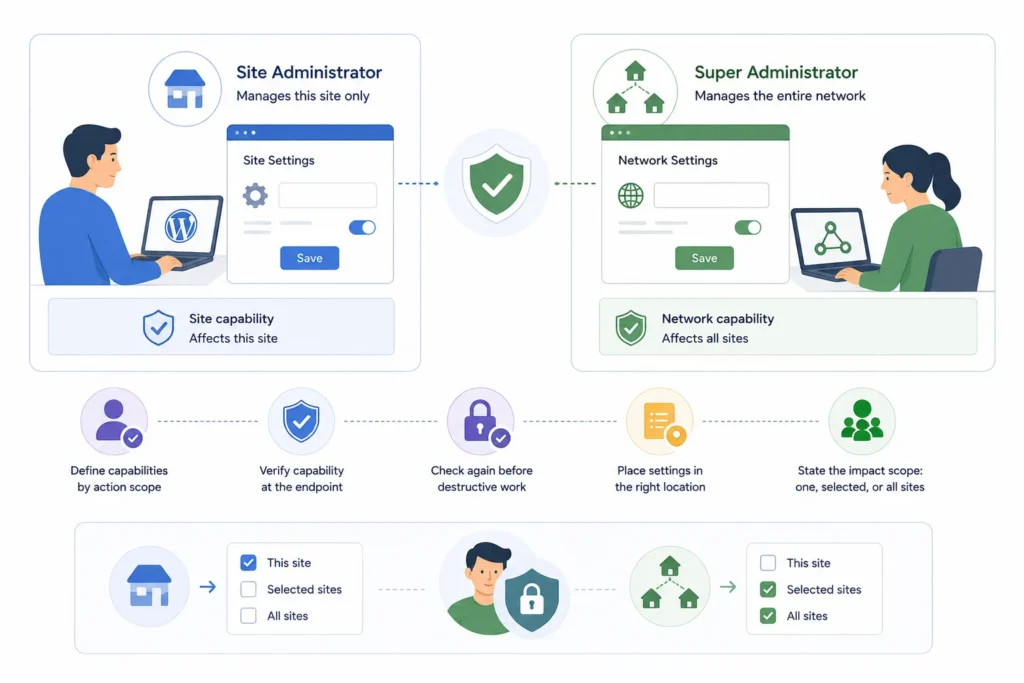
A site administrator and a super administrator are not interchangeable.
Site administrators should control actions affecting only their site. Super administrators may manage network-wide configuration, shared infrastructure, or data spanning several sites.
Define capabilities according to action scope. A site-level settings update may require a site capability, while network-wide deletion or configuration should require a network capability.
Verify authorization at the endpoint and again before destructive work. A nonce confirms request intent, but it does not replace a capability check.
Place site-owned settings in site administration and network-owned controls in network administration. Explain whether each action affects one site, selected sites, or the whole network.
Prevent Cross-Site Data Exposure
Multisite plugins must keep site data separated unless cross-site access is intentional.
Do not expose one site’s data through another site’s REST responses, cache entries, exported files, logs, or administration screens. Include the site ID in cache keys when values depend on site context.
Per-site custom tables should use the correct site prefix. A shared network table should include explicit site ownership fields when records belong to individual sites.
Shared files, diagnostics, and reports must preserve site boundaries. Test with users holding different roles across multiple sites.
Choose Global or Per-Site Custom Tables Carefully
Custom table design should follow data ownership and query patterns.
Per-site tables suit data owned independently by each site and use each site’s database prefix.
A global table may suit network-owned information, shared queues, centralized licensing, or cross-network reporting. It requires strict access controls, site identifiers, indexes, and explicit filtering.
Do not choose one global table merely to avoid migrations. Storage convenience should not override ownership and security. Track the schema version at the same scope as the table.
Design Scheduled Tasks for Site Context
Scheduled and background tasks must know which site they belong to.
Store the intended site ID with each job. When the worker runs, switch to that site deliberately, perform the bounded operation, and restore the previous context.
Do not assume cron runs with the same site context in which the job was created. Shared queues and command-line workers may execute elsewhere.
For network-wide jobs, enqueue smaller site-specific tasks. This makes failures easier to retry and prevents one slow site from blocking the rest.
Plan Upgrades for Network Scale
Upgrades should be resumable, observable, and safe to repeat.
A network-owned setting may require one migration. Site options or per-site tables may require one migration for every site. Store progress and avoid marking the upgrade complete until all batches succeed.
Test upgrades from several older plugin versions. Include sites created before and after network activation, archived sites, inactive sites, and networks with different activation states.
The WordPress Multisite administration model should be part of the compatibility review, along with WordPress plugin best practices for permissions, database changes, and safe releases.
Make Cleanup and Uninstall Predictable
Uninstalling a Multisite plugin can involve large amounts of data.
Do not delete every site’s options, tables, jobs, and files in one request. Large cleanup operations should be resumable and clearly communicated.
Explain whether deactivation preserves data and whether uninstall removes site-level, network-level, or both kinds of information. Consider whether administrators need an export before deletion.
If the plugin monitors or cleans data, explain the scope before the action begins. This principle is central to Mediachecker and other maintenance tools where site ownership matters.
Implementation Checklist
Define network and site data ownership. Document per-site and network activation behaviour. Initialize newly created sites. Batch network-wide work. Restore blog context after every switch. Separate site-administrator and network-administrator permissions. Include site ownership in caches, files, APIs, and custom tables. Test upgrades and uninstall on large staging networks.
Build Reliable WordPress Multisite Plugins at Network Scale
Contact WPStack to identify and resolve Multisite issues involving site context, network settings, permissions, custom tables, scheduled tasks, migrations, cache separation, activation, and uninstall workflows.
WPStack provides custom WordPress plugin development and Multisite compatibility services to help businesses build secure, maintainable, and production-ready solutions with clear site-level ownership, network-level controls, resumable background processing, and dependable cross-site data protection.
Planning a new Multisite plugin or adapting an existing plugin for large networks? Request a custom WordPress plugin assessment with WPStack and discuss your requirements with an experienced development team.
Frequently Asked Questions
Do not assume one activation hook automatically completes every site-scoped migration. Design explicit network installation logic and test it across existing and newly created sites.
Choose according to data ownership and query requirements. Per-site tables use each site prefix. Truly network-owned information may justify a global table with strict access boundaries.
Only when the product deliberately grants that authority. Use network capabilities and a network-administration interface for network-wide changes.
Store the intended site ID with the job, switch context deliberately, restore it afterward, and process work in bounded batches.
Planning a production plugin? Review what makes a WordPress plugin production-ready, browse the WPStack plugin directory, or discuss a custom build.

Aditya Bhimrajka is a technology entrepreneur, product strategist, and software solutions expert with over a decade of experience building scalable web and mobile applications. His expertise spans SaaS, AI, cloud technologies, custom software development, and digital transformation. Passionate about solving real-world business challenges through technology, Aditya shares practical insights on WordPress, plugins, software development, startup growth, product strategy, and emerging technologies. At WPStack, he writes actionable, experience-driven content that helps developers, businesses, and website owners build secure, high-performing, and future-ready WordPress solutions.
Post a Comment