
What Drives WordPress Plugin Maintenance Cost After Launch?
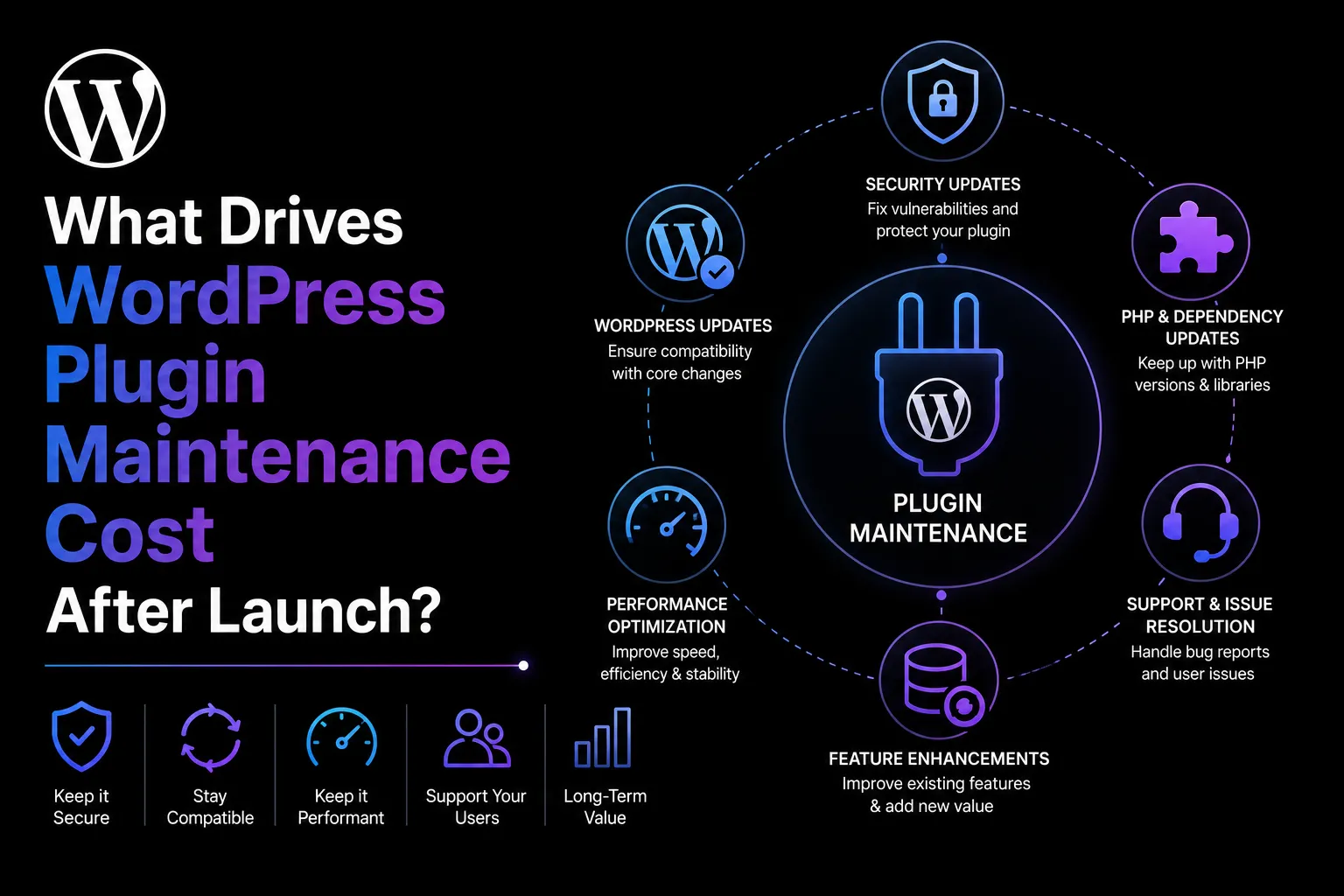
The first release does not reveal the full cost of a WordPress plugin. Maintenance begins when WordPress, PHP, WooCommerce, browsers, APIs, hosting environments, security expectations, and customer workflows continue changing around it.
A plugin may remain stable for months before a core update, revised API, browser change, or unexpected customer environment creates new engineering work.
A useful maintenance estimate should therefore be based on the plugin’s risk and change surface, not a flat percentage of its original development cost.
Compatibility Surface
Compatibility is one of the biggest drivers of WordPress plugin maintenance cost.
A focused plugin built on stable WordPress APIs is generally easier to maintain than a product connected to several page builders, payment gateways, multilingual tools, custom themes, and membership systems. Every supported dependency adds another potential failure point and release combination to test.
The depth of each integration matters as much as the number. A simple data export may need limited checking, while an extension that changes checkout, permissions, order statuses, or content rendering requires broader regression coverage.
Supporting multiple WordPress, PHP, WooCommerce, browser, database, and hosting versions expands the compatibility matrix. A written support policy prevents every customer environment from becoming a permanent maintenance commitment.
Security and Data Impact
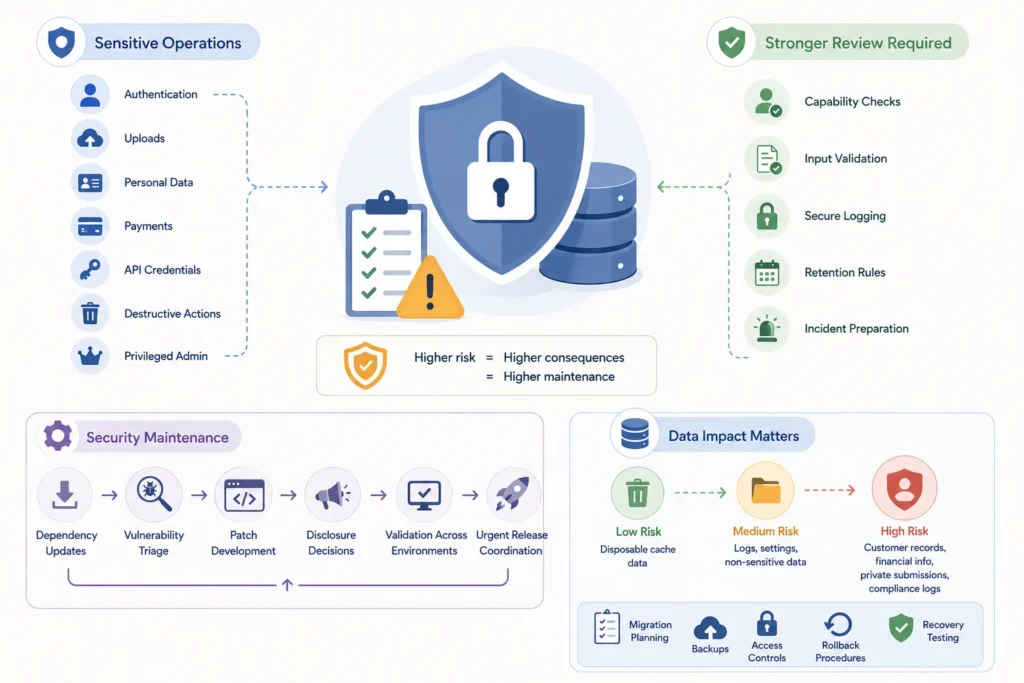
Plugins that handle sensitive operations usually cost more to maintain because failures have greater consequences.
Authentication, uploads, personal data, payments, API credentials, destructive actions, and privileged administration require stronger review. These features need capability checks, input validation, secure logging, retention rules, and incident preparation.
Security maintenance includes dependency updates, vulnerability triage, patch development, disclosure decisions, and validation across supported environments. Security fixes may also need urgent release coordination.
The stored data also matters. Disposable cache data carries less risk than customer records, financial information, private submissions, or compliance logs. Important data requires better migration planning, backups, access controls, rollback procedures, and recovery testing.
External Integrations
Third-party integrations create ongoing maintenance because the plugin does not control their release schedules.
Providers may change authentication methods, endpoints, response fields, rate limits, webhook formats, or availability. A previously stable integration can fail even when the WordPress plugin code has not changed.
Webhooks may be delayed, duplicated, replayed, or delivered out of order. Test accounts may expire, and sandbox environments may behave differently from production.
Maintenance should cover monitoring, retry rules, fallback behaviour, test credentials, error classification, and coordination with third-party releases. Integrations affecting payments, bookings, fulfilment, or customer communication usually need faster responses and stronger recovery testing.
Support and Release Operations
Support work is part of maintenance even when no code change is required.
A user report must be reviewed, reproduced, classified, and tested. The problem may depend on a particular host, role, browser, theme, plugin conflict, cache layer, database version, or upgrade history.
As the install base grows, environment diversity also grows. More installations can reveal rare hosting limitations and integration combinations that were never present during launch testing.
Updates may require changelogs, packaging, staging, deployment checks, backups, documentation, and rollback preparation. These activities should be included in the maintenance estimate rather than treated as free.
Supported WordPress and PHP Versions
The supported version range directly affects maintenance effort.
Supporting only current WordPress and PHP releases reduces the number of test environments. Supporting older versions may increase customer reach, but it also creates more compatibility code, fixtures, and regression work.
Define the minimum supported WordPress and PHP versions and when older versions will leave support. WooCommerce extensions should also document supported WooCommerce versions, order-storage modes, checkout systems, and related dependencies.
Number of Integrations
Each integration may require authentication, settings, webhooks, background jobs, monitoring, documentation, and test accounts.
Estimate both the number of integrations and their business importance. A secondary analytics connection may tolerate temporary failure. A payment gateway or fulfilment system may require urgent investigation and careful recovery.
Integrations may also interact with each other. A checkout extension, subscription plugin, tax service, and payment gateway may all modify the same order workflow. Maintaining that combination requires more testing than maintaining each integration independently.
Data and Permission Risk
Complex roles, object-level permissions, private records, and destructive actions increase maintenance needs.
Permission models must remain correct when WordPress roles change, Multisite is enabled, REST endpoints are introduced, or new workflows are added.
Assess what the plugin can read, modify, delete, transmit, or reveal. The greater the possible impact of an incorrect action, the greater the review, testing, and incident-response requirement.
Plugins that only display public information usually have a smaller risk surface than plugins that manage accounts, payments, private documents, or irreversible operations.
Automated Test Coverage
Automated tests reduce repeated manual work, but they also require maintenance.
A strong test suite can verify important workflows across several WordPress, PHP, and WooCommerce versions. It can catch regressions before release and make dependency updates safer.
However, tests must evolve with the product. New integrations, data structures, and user workflows need new fixtures and test cases.
Automation cannot fully replace manual review for accessibility, visual behaviour, usability, hosting-specific issues, and unexpected interaction paths. Test coverage reduces uncertainty, but it does not eliminate maintenance cost.
Support Response Expectations
Response targets influence staffing and budget.
A plugin promising next-business-day support requires more operational readiness than one offering monthly review or community support. Define coverage hours, severity levels, escalation paths, and what qualifies as a critical incident.
Checkout failures, payment errors, security issues, and data loss may require faster handling than cosmetic defects. The maintenance budget should reflect the promised service level.
Support expectations should also state what information customers must provide, such as plugin versions, logs, reproduction steps, hosting details, and active integrations.
Release and Rollback Process
Reliable releases require staging, test evidence, backups, deployment checks, and a recovery plan.
The team should know whether rollback means restoring plugin files, reversing a database migration, applying a forward fix, or restoring a database backup. Persistent data changes can make rollback more complicated than replacing code.
A repeatable release and rollback process reduces outage risk, but it adds real engineering and operational work.
The maintenance plan should identify who approves releases, who can deploy urgent fixes, how backups are verified, and what happens when an upgrade cannot be safely reversed.
How to Budget Responsibly
Begin by defining a supported compatibility matrix, response targets, release cadence, included support hours, and ownership for security work.
Use the custom plugin pricing guide for initial build costs and the maintenance checklist for recurring work. Keep feature development separate from maintenance so product owners can distinguish preserving current behaviour from expanding product scope.
The estimate should reflect the actual product rather than applying the same maintenance percentage to every plugin. Review the arrangement whenever adoption, integrations, risk, or customer expectations change.
Build a Compatibility Matrix
List the WordPress, PHP, WooCommerce, browser, database, hosting, and key integration versions the plugin promises to support. Define the required test depth and when older versions will leave support.
Include fresh installations, upgrades, Multisite where relevant, object caching, background jobs, and important integration combinations.
Without a compatibility matrix, every reported customer environment can become an implied long-term support commitment.
Separate Maintenance from New Features
Maintenance preserves supported behaviour through bug fixes, compatibility work, security updates, dependency review, support, documentation, and release operations.
New workflows, integrations, reports, and interface changes expand product scope. Estimate these separately so the maintenance budget is not consumed by unplanned product development.
The maintenance agreement should explain how feature requests are classified, estimated, approved, and scheduled.
Use Maintenance Data to Improve the Product
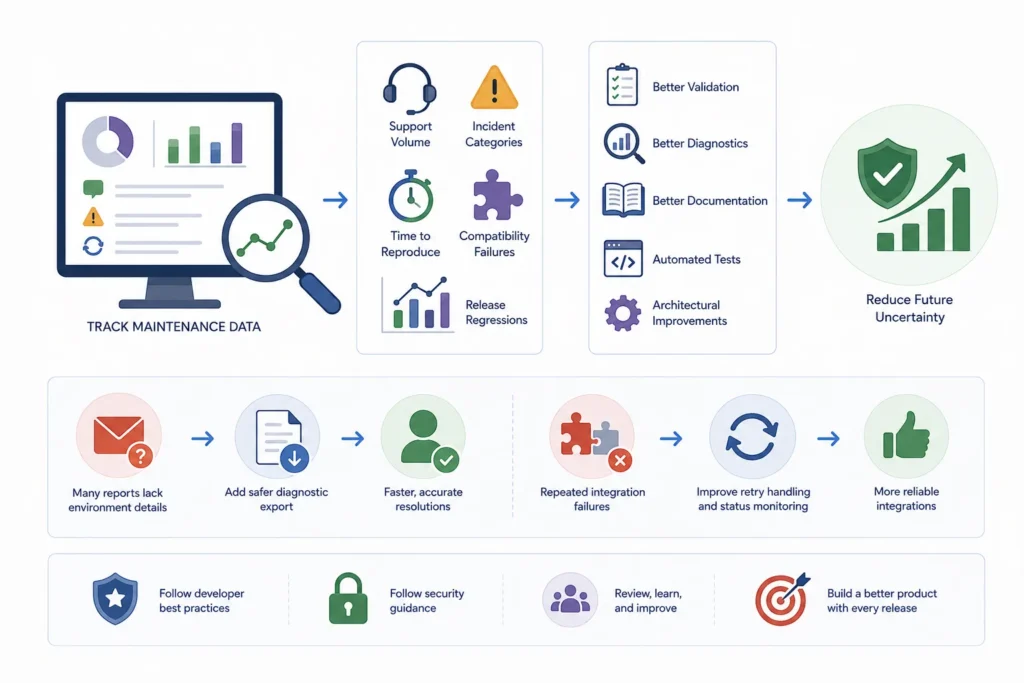
Track support volume, incident categories, time to reproduce, recurring compatibility failures, and release regressions.
Repeated problems around one workflow may justify better validation, diagnostics, documentation, automated tests, or architectural changes.
For example, frequent reports caused by missing environment details may justify a safer diagnostic export. Repeated integration failures may justify better retry handling and status monitoring.
The most useful maintenance program reduces future uncertainty instead of only reacting to tickets.
The WordPress plugin developer best practices and WordPress plugin security guidance can support the internal maintenance review process.
Plan WordPress Plugin Maintenance Around Real Product Risk
Contact WPStack to create a practical maintenance plan based on your plugin’s compatibility requirements, security exposure, integrations, stored data, support expectations, testing needs, and release process—not a generic percentage of the original build cost.
Our custom WordPress plugin maintenance and development services help businesses manage compatibility testing, security updates, dependency reviews, technical support, release preparation, documentation, monitoring, and rollback planning.
Protect your plugin after launch with a maintenance strategy built around its actual risk and change surface.
Frequently Asked Questions
A percentage can be used as a planning shortcut, but risk, integrations, support expectations, compatibility surface, and release processes provide a more useful estimate.
It should include compatibility testing, security updates, dependency review, monitoring, support, documentation, backups, releases, and rollback procedures.
No. They reduce regression risk and manual repetition, but environments, integrations, requirements, browser behaviour, and security threats continue to change.
Review it whenever usage, supported versions, integrations, data risk, release cadence, or support expectations change.

Aditya Bhimrajka is a technology entrepreneur, product strategist, and software solutions expert with over a decade of experience building scalable web and mobile applications. His expertise spans SaaS, AI, cloud technologies, custom software development, and digital transformation. Passionate about solving real-world business challenges through technology, Aditya shares practical insights on WordPress, plugins, software development, startup growth, product strategy, and emerging technologies. At WPStack, he writes actionable, experience-driven content that helps developers, businesses, and website owners build secure, high-performing, and future-ready WordPress solutions.
Post a Comment