
Safe Database Migrations in WordPress Plugins
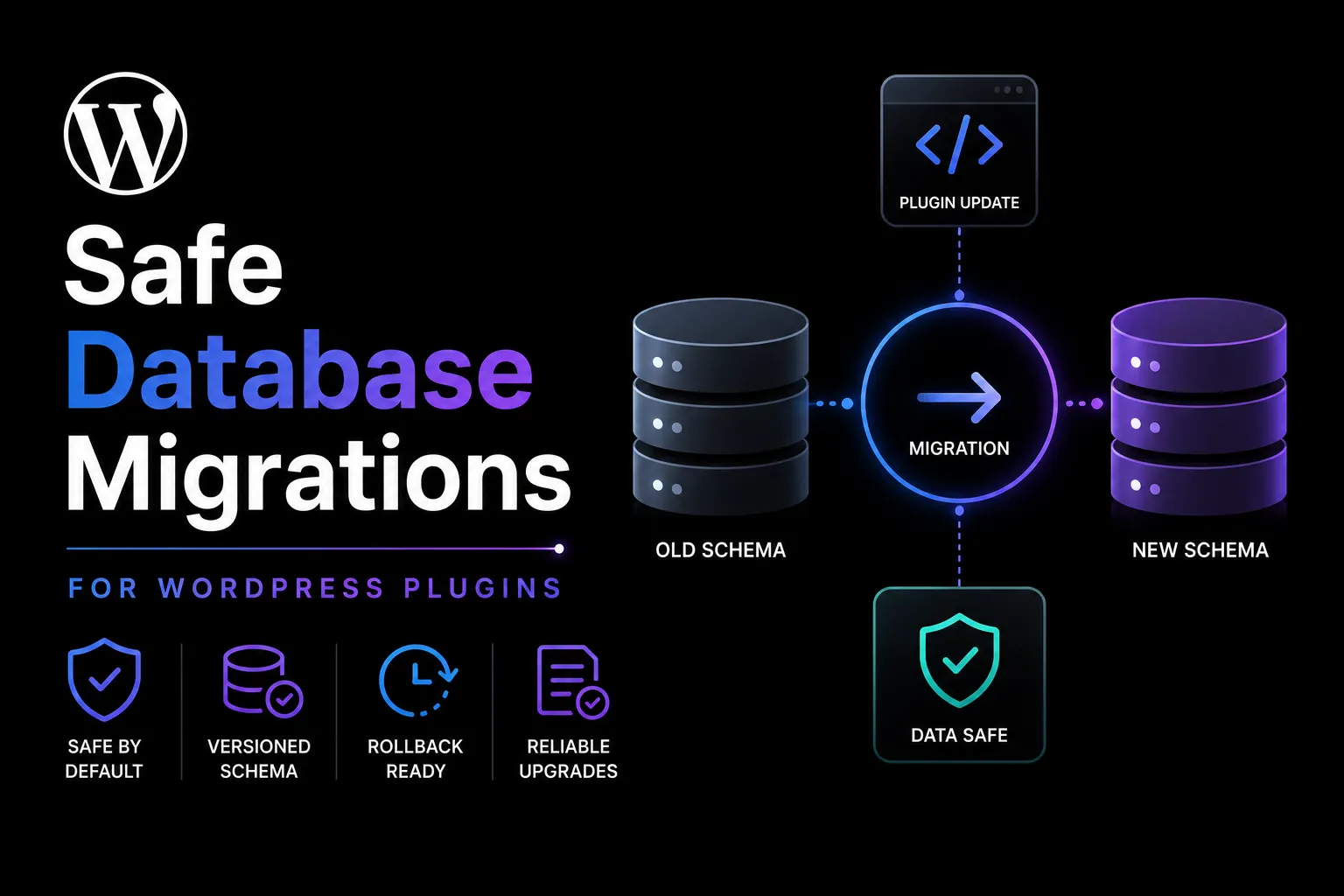
Database migrations are one of the most dangerous parts of a WordPress plugin update. A normal code release can usually be reversed by restoring the previous plugin files. A migration may permanently change tables, rewrite options, transform records, or delete information that older code still expects.
The safest migrations are versioned, repeatable, bounded, observable, and separated from frontend requests whenever the work may take more than a few moments. They should support skipped releases, interrupted execution, retries, and realistic recovery procedures.
This guide is for WordPress product owners, developers, and agencies that need a repeatable engineering decision rather than a shortcut that works only on one installation.
Use a Schema Version, Not the Plugin Version
The plugin version and database schema version describe different things.
The plugin version identifies the installed release. The schema version identifies the current structure and state of persistent storage. A plugin release may contain interface or bug-fix changes without modifying the database. Another release may require several schema changes.
Store a dedicated schema version in a namespaced option. During an update, compare the stored version with the target schema version and run only the missing migration steps.
For example, a site moving from schema version 3 to version 6 should run migrations 4, 5, and 6 in sequence. It should not assume that every customer installed each intermediate plugin release.
This approach makes skipped versions and partial upgrades easier to understand. It also gives support teams a clear way to identify whether a problem belongs to the code release or the stored data structure.
Make Every Migration Idempotent
A migration should be safe to run more than once.
Updates can be interrupted by timeouts, database failures, deployment errors, worker crashes, or server restarts. WordPress may execute the update path again before the previous attempt fully completed.
An idempotent migration checks the current state before making a change. It should not duplicate records, recreate scheduled jobs, append the same values repeatedly, or corrupt data when retried.
For example, before adding a column, confirm whether the column already exists. Before copying records, use a stable identifier or unique constraint to prevent duplicates. Before scheduling a recurring task, verify that the same event has not already been registered.
Record completion only after the migration step has actually succeeded. Updating the schema version too early can leave the database in a partial state while telling the plugin that no further work is required.
Keep Migration Steps Small and Explicit
Avoid placing several unrelated changes inside one large migration function.
Create separate steps for table changes, option transformations, backfills, index creation, data cleanup, and scheduled-job registration. Smaller steps are easier to test, retry, observe, and troubleshoot.
Each migration should define its starting version, target version, purpose, expected data changes, and recovery implications.
Do not hide important transformations inside ordinary request logic. A migration should have a recognizable execution path and a clear completion state.
Understand What dbDelta Can and Cannot Do
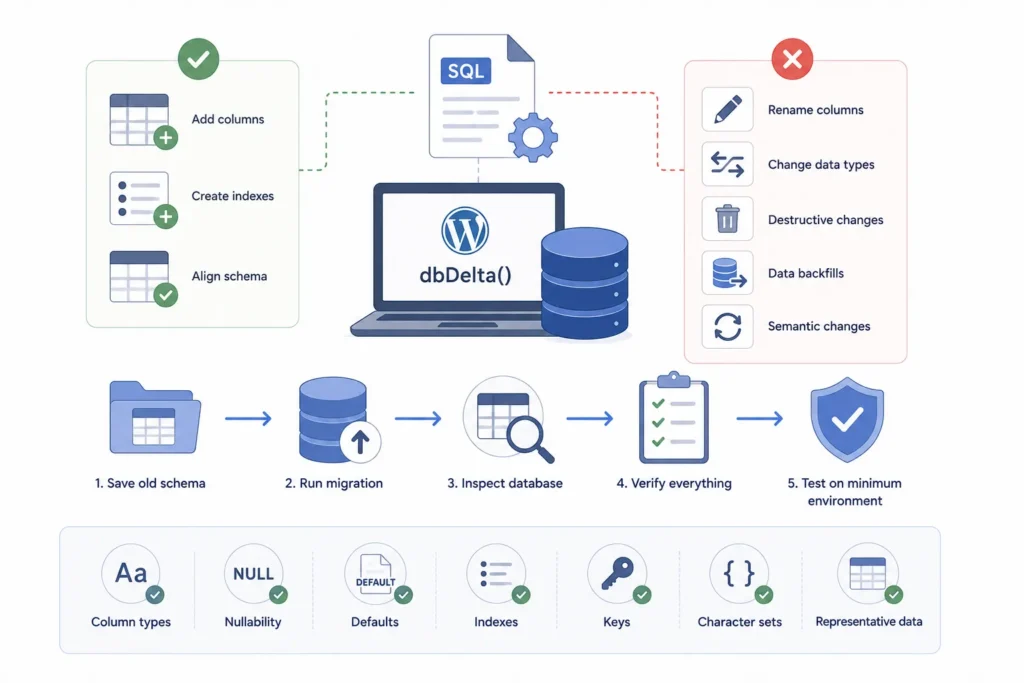
WordPress provides dbDelta() for creating and updating custom database tables from CREATE TABLE statements. It can be useful for adding columns, creating indexes, and aligning a table with a declared schema.
However, it has specific SQL formatting expectations, and not every database transformation is handled automatically. Column definitions, spacing, index syntax, and primary keys may affect how the statement is interpreted.
Destructive changes, column renaming, data-type conversions, data backfills, and semantic transformations usually require explicit migration code.
Do not assume success because dbDelta() returned without a visible error. Keep a fixture containing the old schema, run the migration, and then inspect the actual database state.
Verify column types, nullability, defaults, indexes, keys, character sets, and representative data. Test the final release package against the minimum supported database environment.
The Creating tables with plugins guidance and dbDelta reference can support the internal review of custom-table installation and update behaviour.
Test from Every Supported Prior Version
Testing only a fresh installation is not enough.
Create migration fixtures representing each plugin version that customers may still be using. A site upgrading from the immediately previous release may behave differently from one skipping several years of updates.
For each supported starting point, verify that the plugin reaches the target schema without losing data or repeating work.
Include empty tables, large tables, missing optional values, unexpected legacy values, partially completed migrations, and sites where an earlier update failed.
Test both the schema and the behaviour of the upgraded plugin. A column may exist correctly while the transformed values remain incompatible with the new code.
Move Large Backfills into Bounded Batches
Adding a nullable column may complete quickly. Recalculating hundreds of thousands or millions of rows may not.
Do not run substantial backfills inside one activation request, admin page load, REST response, or frontend request. Split the work into bounded batches.
A worker might process 100 records, several database pages, or a few seconds of work before saving a cursor and releasing resources. The correct size depends on hosting limits, record complexity, query cost, and the minimum environment the plugin supports.
Persist the last successful cursor so processing can resume after interruption. Use locks to prevent overlapping workers and make every batch safe to retry.
Display progress from durable database state rather than a browser connection. Closing the administration tab should not abandon the migration.
Separate Schema Changes from Data Transformations
Schema changes and data changes often have different operational risks.
Creating a new nullable column or table may be fast enough to complete during an update check. Filling that column for existing records may require background processing.
When possible, deploy the structural change first, allow old and new data formats to coexist temporarily, and then perform the backfill in batches.
The application may need compatibility logic while the migration is incomplete. New code can read the new field when present and fall back to the legacy value otherwise.
Provide a maintenance or compatibility mode when old and new code cannot operate safely at the same time.
Avoid Long Transactions and Remote Calls
Transactions can protect small groups of related database changes, but they are not a universal solution.
Long migrations may hold locks, block other requests, and increase rollback cost. Database definition operations may also behave differently depending on the storage engine and server configuration.
Never hold a database transaction open while waiting for an external API, remote file, email service, or background system.
Test transaction behaviour on supported database engines and keep transactional sections small and local.
Plan Recovery Before Deployment
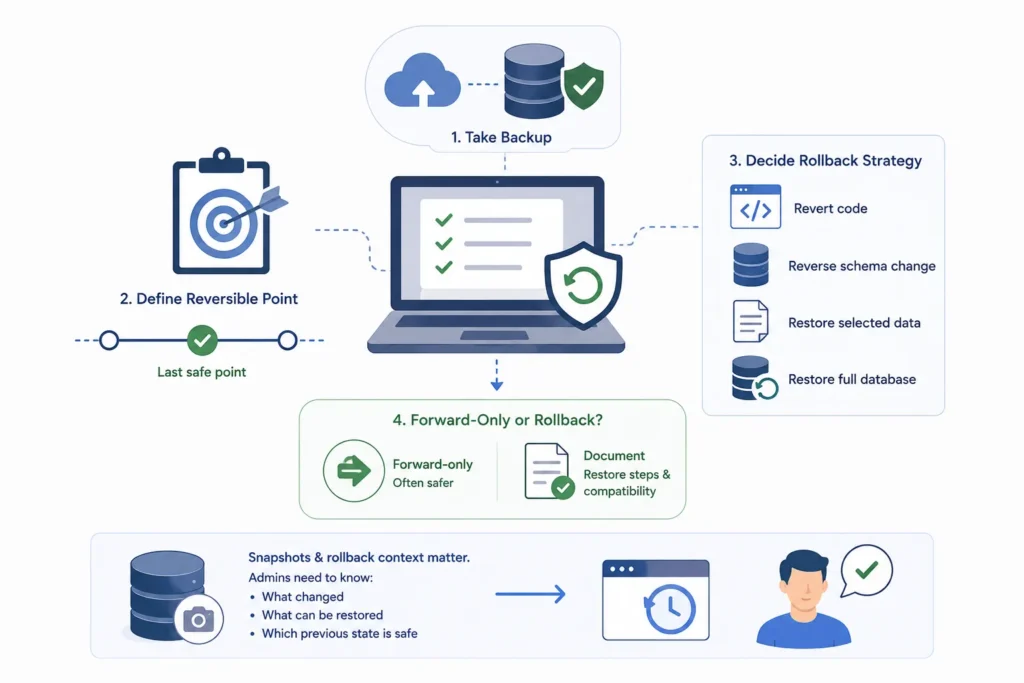
Every migration needs a recovery plan before release.
Take a database backup and verify that it can be restored. Define the last reversible point and decide what rollback actually means.
Rolling back may involve reverting the plugin code, reversing a schema change, restoring selected records, or restoring the entire database. These actions are not interchangeable.
Forward-only migrations are sometimes safer than attempting to reverse destructive changes. In that case, document the restore procedure and compatibility requirements clearly.
The Autoloaded Options Manager illustrates why snapshots and rollback context matter before persistent WordPress changes. Administrators need to understand what changed, what can be restored, and which previous state is considered safe.
Make Migrations Observable
A migration should explain what it is doing.
Record the migration version, start time, completion time, duration, batch cursor, affected rows, retry count, and sanitized failure category. Avoid logging credentials, personal information, complete database rows, or sensitive configuration values.
Expose the current migration state in a protected administration or diagnostic screen. Useful states may include pending, running, paused, completed, retrying, and failed.
When failure occurs, provide a controlled retry path rather than asking the administrator to reload the page repeatedly.
Implementation Checklist
Maintain a dedicated schema version. Make each migration idempotent. Keep migration steps small and explicit. Test from every supported prior version. Verify the final schema rather than trusting return values. Batch expensive data transformations. Persist progress after successful work. Use locks for concurrent workers. Log progress without sensitive data. Define rollback and restore procedures before deployment.
Build Safer WordPress Database Migrations
Contact WPStack to plan and execute WordPress plugin migrations with versioned schema updates, idempotent steps, bounded backfills, durable progress tracking, clear recovery procedures, and reliable testing across supported upgrade paths.
WPStack provides custom WordPress plugin development and migration services to help businesses update tables, options, indexes, and stored records without creating data loss, duplicate processing, incomplete upgrades, or unexpected downtime.
Planning a major plugin update or struggling with a failed database migration? Request a custom WordPress plugin assessment with WPStack and discuss your requirements with an experienced development team.
Frequently Asked Questions
No. Activation hooks are not called during ordinary updates. Schema-version checks require an appropriate update path that runs when the installed storage version is behind the target version.
No. It helps create and modify tables, but data backfills, destructive changes, column renaming, and complex transformations require explicit versioned migration code.
Small compatible operations may benefit from transactions. Long migrations and database definition behaviour vary, so test the database engine and avoid transactions across slow or external work.
Store progress only after successful batches, use locks to prevent concurrent execution, and make retrying the same migration step safe.

Aditya Bhimrajka is a technology entrepreneur, product strategist, and software solutions expert with over a decade of experience building scalable web and mobile applications. His expertise spans SaaS, AI, cloud technologies, custom software development, and digital transformation. Passionate about solving real-world business challenges through technology, Aditya shares practical insights on WordPress, plugins, software development, startup growth, product strategy, and emerging technologies. At WPStack, he writes actionable, experience-driven content that helps developers, businesses, and website owners build secure, high-performing, and future-ready WordPress solutions.
Post a Comment